GB
English
Instruction Manual
Sound Function
If mode mig or mig pulse is selected, any increase or decrease of the stored job,
done by the digital buttons of the torch, determines a sequence of sounds that in-
dicate the number on the arc. If the adjustment, however, is made on the conven-
tional parameters, such as voltage or the wire speed, the sound accompanying the
increase or decrease of the parameter. A different sequence is emitted when they
are reached the minimum and maximum limits of the adjustment.
Inch Wire Function
This function is used during loading of the wire. I press the button on the mig torch
until the display shows the word “INC”, release the button and press again within 3
seconds. Now the wire advances quickly. To stop the process release the button.
Wire Speed Calibration Function
With this process it is perfectly possible to calibrate the speed of the wire which,
with the use of different torches and welding wires with different diameter and con-
sistency may increase or decrease the drag. The procedure is as follows: Press the
torch switch until the ashlight shows “INC”, within 3 second press 3 times switch
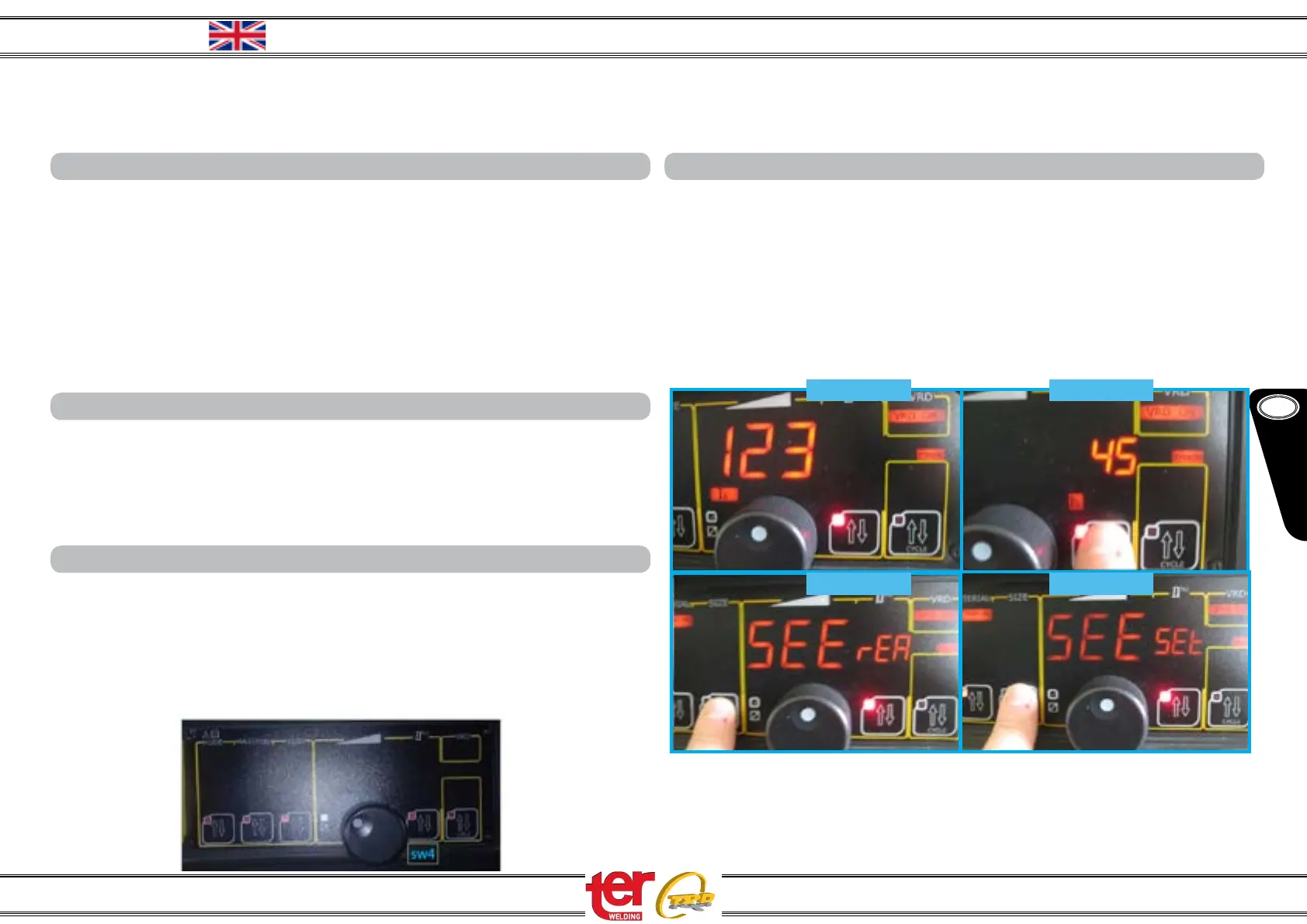
sw4, then, press again the torch switch.
Welding Parameter Function
With this mode of operation the display, during the welding, indicating the actual val-
ues of current and voltage. In default mode, however, only the set of welding pa-
rameters are displayed. The function mode is activated by “MMA Manual”, set the
encoder to the current 123 (PICTURE 1), press the button of the parameter 2 and
with the encoder set “45” (PICTURE 2), now press the size button for 5 seconds, the
message “SEE rEA” indicates that’ll display the actual data (PICTURE 3). By pressing
another 5 seconds will return to the original mode and the display will read “SEE SEt”
(PICTURE 4).
PICTURE 1
PICTURE 2
PICTURE 4PICTURE 3
4
Multi 250 - 400K - 500F - 500K - 5000FW - 500MAR e Accessories


 To Next Page
 Loading...