EasyManua.ls Logo

Teradek Vidiu Go - User Manual

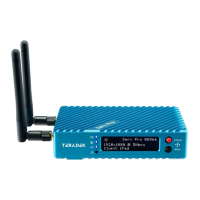
Teradek Vidiu Go
14 pages
Print Icon
To Next Page IconTo Next Page
Loading...
Quick Start Guide

Other manuals for Teradek Vidiu Go

Questions and Answers

Summary

Physical Properties Overview

VidiU Node Connectivity

Description of VidiU Node and compatible USB modems.

Button Operation

Menu Navigation Button

Use arrow buttons to navigate menus; center button to confirm.

Broadcast;Record Button

Start or stop broadcast or recording sessions.

Battery Information

Power and Connection Setup

Connecting Power

Connect power to VidiU Go using a USB-C power source.

Connecting Video Input

Connect HDMI or SDI output from your video source.

Device Activation

Press the front panel power button to turn on the device.

Getting Online

Accessing the Web UI

Connect to a network and use the IP address in a web browser.

Connecting via USB Modem

Insert VidiU Node or USB modem into ports and wait for icon.

Connecting via Cellular Data

Connect phone to VidiU WiFi, use VidiU app, and share cellular data.

Network Connectivity Options

WiFi Network Connection

Connect to VidiU's WiFi (AP mode) or existing networks (Client mode).

Ethernet Connection

Connect via Ethernet cable and verify network settings.

Core Cloud Service

Connecting VidiU to Core

Configure VidiU Go via app, web UI, or front panel to connect to Core.

HEVC and H.264 Conversion

Using the Core Web UI

Switch to H.264 via settings menu, codec selection, and apply.

Using the Core App

Switch to H.264 via encoder details, settings, and apply.

Sharelink Cloud Service

Supported Connections

Lists Ethernet, USB modems, WiFi AP/Client modes for Sharelink.

Activating Sharelink

Connect to VidiU WiFi, log in via Cloud menu, or create account.

Platform and Quality Settings

Platform Selection

Choose Ustream, YouTube, Facebook, or manual RTMP.

Broadcast Quality

Select video bitrate and resolution for broadcast.

Initiating Broadcast

Press Broadcast/Record button on device, web UI, or app.

VidiU App Usage

App Features Overview

Remotely monitor, configure VidiU, and broadcast from phone/tablet.

Recording Broadcasts

Recording Setup

Insert SD card or USB drive and enable recording in the menu.

Recording Operation

Recordings triggered by broadcast, continue during interruptions.

Firmware Updates and Support

Updating Firmware

Update device firmware via app or teradek.com for performance improvements.

Getting Help

Contact support via website, email, or phone for assistance.

Teradek Vidiu Go Specifications

General IconGeneral
Video InputsHDMI
Video CodecH.264
Supported Resolutions1080p, 720p, 576p, 480p
ConnectivityEthernet, Wi-Fi
BondingYes
Streaming PlatformsFacebook Live, YouTube, Wowza, Twitch, Ustream
PowerDC 5V

Related product manuals