EasyManua.ls Logo

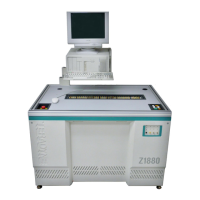
Teradyne Z1880 - User Manual

Default Icon
118 pages
Print Icon
To Next Page IconTo Next Page
Loading...
Artisan Technology Group is your source for quality
new and certied-used/pre-owned equipment
FAST SHIPPING AND
DELIVERY
TENS OF THOUSANDS OF
IN-STOCK ITEMS
EQUIPMENT DEMOS
HUNDREDS OF
MANUFACTURERS
SUPPORTED
LEASING/MONTHLY
RENTALS
ITAR CERTIFIED
SECURE ASSET SOLUTIONS
SERVICE CENTER REPAIRS
Experienced engineers and technicians on staff
at our full-service, in-house repair center
WE BUY USED EQUIPMENT
Sell your excess, underutilized, and idle used equipment
We also offer credit for buy-backs and trade-ins
www.artisantg.com/WeBuyEquipment
REMOTE INSPECTION
Remotely inspect equipment before purchasing with
our interactive website at www.instraview.com
LOOKING FOR MORE INFORMATION?
Visit us on the web at www.artisantg.com for more
information on price quotations, drivers, technical
specications, manuals, and documentation
Contact us: (888) 88-SOURCE | sales@artisantg.com | www.artisantg.com
SM
View
Instra

Table of Contents

Questions and Answers

Summary

Safety

Safety Practices

Lists safety features and best practices for tester operation and handling.

Power On;Off Sequence

Provides step-by-step instructions for safely powering the tester on and off.

Normal Power Off Procedure

Details the procedure for safely powering down the tester, computer, and printer.

Emergency Power Off

Describes how to shut off all power to the tester in emergency situations.

Emergency Manual Off Switch

Explains the function and operation of the EMO switch for immediate power cutoff.

Operating the Tester

Board Preparation

Details steps for loading fixtures, vacuum, and boards onto the tester.

Testing Boards

Outlines the process of logging in, selecting programs, and running tests.

Set Up for Static Safety

Explains how to implement antistatic safeguards for protecting components.

Load the Fixture and Board

Provides procedures for loading fixtures and boards onto various Z1800-Series testers.

Log In Procedure

Details the default operator login procedure for accessing the test system.

Running the Test Program

Covers selecting and executing test programs through menu navigation.

Select the Test Program

Guides users through selecting a test program from available options.

Run the Test Program

Details the steps to start and execute a selected test program.

Testing Digital Connectivity

Digital Tracer Overview

Introduces Digital Tracer as a tool for testing digital component connectivity via a probe.

Probing Component Pins

Guides users on probing component leads and handling probe contact feedback.

Analyzing Printout of Test Results

Troubleshooting for Operators

Tester Power Issues

Addresses problems related to tester power, including solutions for no power.

Inconsistent Board Failures

Provides solutions for issues causing inconsistent results on board tests.

Teradyne Z1880 Specifications

General IconGeneral
BrandTeradyne
ModelZ1880
CategoryTest Equipment
LanguageEnglish

Related product manuals