EasyManua.ls Logo

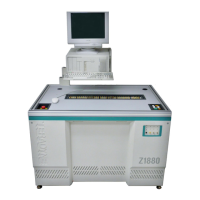
Teradyne Z1820 - User Manual

Default Icon
118 pages
Print Icon
To Next Page IconTo Next Page
Loading...
Artisan Technology Group is your source for quality
new and certied-used/pre-owned equipment
FAST SHIPPING AND
DELIVERY
TENS OF THOUSANDS OF
IN-STOCK ITEMS
EQUIPMENT DEMOS
HUNDREDS OF
MANUFACTURERS
SUPPORTED
LEASING/MONTHLY
RENTALS
ITAR CERTIFIED
SECURE ASSET SOLUTIONS
SERVICE CENTER REPAIRS
Experienced engineers and technicians on staff
at our full-service, in-house repair center
WE BUY USED EQUIPMENT
Sell your excess, underutilized, and idle used equipment
We also offer credit for buy-backs and trade-ins
www.artisantg.com/WeBuyEquipment
REMOTE INSPECTION
Remotely inspect equipment before purchasing with
our interactive website at www.instraview.com
LOOKING FOR MORE INFORMATION?
Visit us on the web at www.artisantg.com for more
information on price quotations, drivers, technical
specications, manuals, and documentation
Contact us: (888) 88-SOURCE | sales@artisantg.com | www.artisantg.com
SM
View
Instra

Table of Contents

Other manuals for Teradyne Z1820

Questions and Answers

  • D
    Dr. Juan Gray DDSAug 9, 2025
    How to fix no vacuum on Teradyne Z1820 Test Equipment?
    • R
      rharrisAug 9, 2025
      If your Teradyne Test Equipment has no vacuum, ensure the vacuum is plugged in and turned on. If you're using a local pump, press the Pump Start switch. Also, verify that the vacuum control switches are turned on.
  • A
    Anthony PopeAug 15, 2025
    How to troubleshoot no power on Teradyne Z1820?
    • J
      jenkinsvalerieAug 15, 2025
      If your Teradyne Test Equipment has no power, try turning the Power Control switch off and on. If the AC power cord isn't connected, turn off the main breaker on the rear panel before connecting the power cord. After connecting, ensure the main AC breaker is on.
  • S
    Shannon HallAug 21, 2025
    What to do if Teradyne Test Equipment is hissing?
    • R
      rherreraAug 21, 2025
      If you hear a hissing noise while running the Teradyne Test Equipment, it's likely that the fixture or the board-under-test is leaking. Remove the fixture or board and have a qualified technician repair the defect.
  • M
    mckinneyjeffreyAug 27, 2025
    What causes low vacuum on Teradyne Z1820 Test Equipment?
    • W
      william85Aug 27, 2025
      If the vacuum pump gauge on your Teradyne Test Equipment shows less than 20 inches of mercury, resulting in loss of vacuum, it could be due to a leak. Check if the fixture or board-under-test is leaking and have a qualified technician repair any defects. Also, inspect the vacuum hose between the tester and pump for leaks, and replace the hose if necessary.
  • D
    Daniel TerrySep 2, 2025
    What to do if an entire batch of boards fails on Teradyne Test Equipment?
    • M
      Monica TurnerSep 2, 2025
      If an entire batch of boards fails the test on your Teradyne Test Equipment, inspect the boards for obvious issues such as damaged or missing components, and then tag the boards for rework.

Summary

CHAPTER 1 SAFETY

General Safety Information

Provides essential safety guidelines and precautions for operating testers.

Safety Practices

Details recommended safety procedures and warnings for tester operation.

Electrostatic Discharge (ESD) Control

Explains ESD hazards and methods for prevention and control.

Emergency Power Off Procedures

Details critical procedures for immediate power disconnection in emergencies.

External Hazards

Identifies potential electrical and mechanical hazards outside the tester.

Electrical Hazards

Details electrical hazards including test points, fixture receivers, and AC connections.

Mechanical Hazards

Details mechanical hazards including fixture receiver pins and probes.

CHAPTER 2 TESTER DESCRIPTION

AC Power System Components

Explains the AC power system, including cords, conditioners, and distribution.

AC Power Distribution Assembly Details

Details AC power distribution assemblies for various Z1800 models.

CHAPTER 3 OPERATING THE TESTER

Daily Operations Overview

Outlines routine tasks and checks before starting board testing.

Board Preparation Steps

Details procedures for preparing the fixture and loading boards for testing.

Testing Boards Process

Covers the steps for logging in, selecting tests, and running the test program.

Static Safety Setup

Ensures proper antistatic measures are in place to protect components.

Loading Fixture and Board

Provides instructions for placing fixtures and boards onto the tester interface.

Operator Login Procedure

Explains the steps for logging into the tester system.

Test Program Execution

Details how to run, monitor, and control test programs on the tester.

Troubleshooting Common Tester Problems

Addresses common issues like power, board failures, and vacuum problems.

Teradyne Z1820 Specifications

General IconGeneral
CategoryTest Equipment
ModelZ1820
ManufacturerTeradyne
Maximum Pin Count1024
ApplicationsSemiconductor testing
Power Requirements200-240V AC, 50/60Hz
Frequency RangeUp to 1 GHz
Measurement ParametersVoltage, Current, Timing, Frequency

Related product manuals