3-363-36
Retrieving Diagnostic CodesRetrieving Diagnostic Codes
Diagnostic fault codes can be retrieved from the CEC2 system using the gearDiagnostic fault codes can be retrieved from the CEC2 system using the gear
shift selector or by plugging in the diagnostic data reader (DDR). To obtainshift selector or by plugging in the diagnostic data reader (DDR). To obtain
diagnostic codes using the gear shift selector:diagnostic codes using the gear shift selector:
- Check transmission warning light on dash will illuminate when ECU detects a- Check transmission warning light on dash will illuminate when ECU detects a
fault.fault.
- Stop truck and select 'Neutral'.- Stop truck and select 'Neutral'.
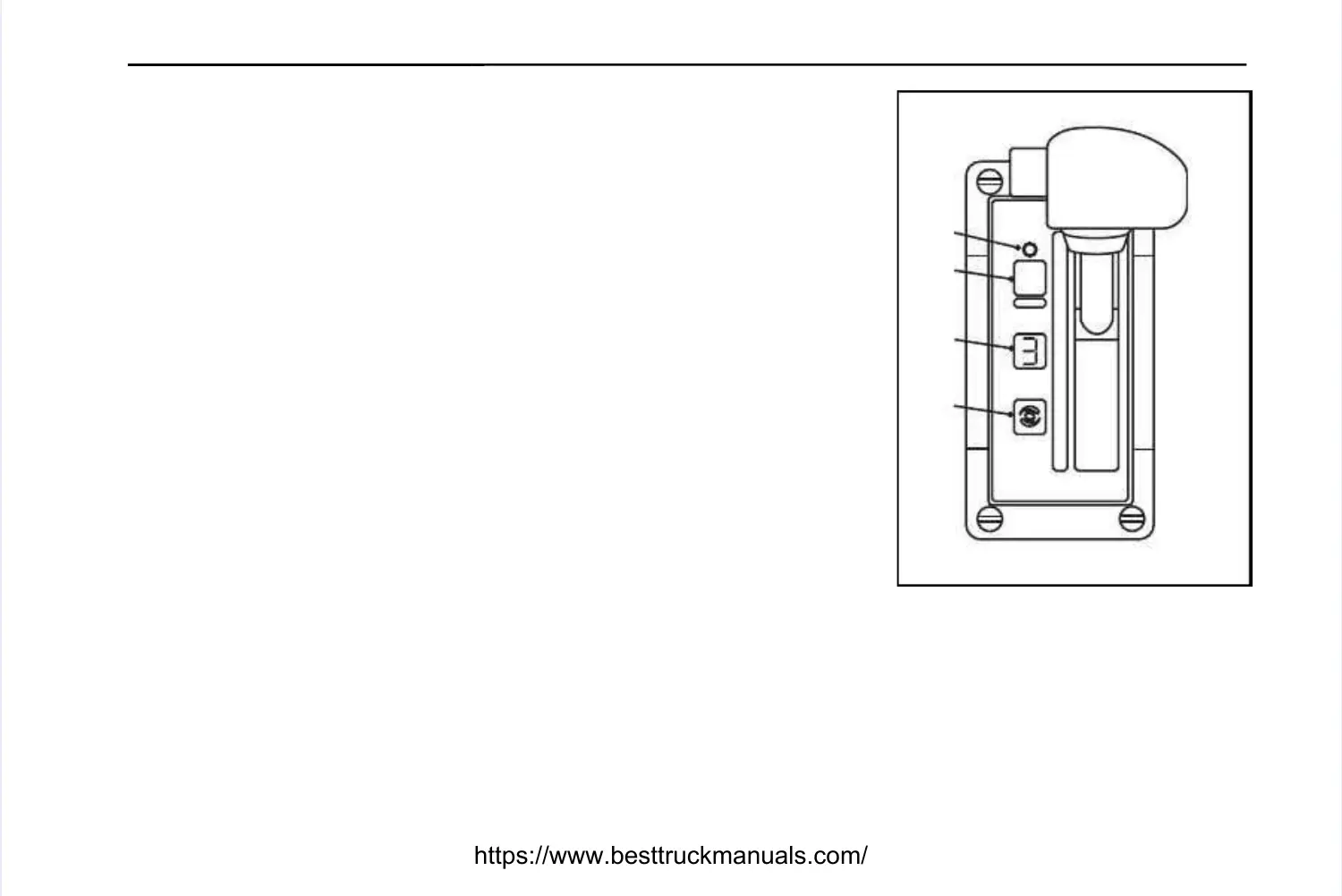
- Press diagnostic button (1) on gear shift selector. Display (2) on gear shift- Press diagnostic button (1) on gear shift selector. Display (2) on gear shift
selector will flash one digit at a time.selector will flash one digit at a time.
- Display starts with code position D1, D2, etc, followed by the two digit main- Display starts with code position D1, D2, etc, followed by the two digit main
code, then the two digit subcode.code, then the two digit subcode.
- To advance to the next code, press the mode button (3). Up to five codes can- To advance to the next code, press the mode button (3). Up to five codes can
be stored.be stored.
- Active codes are indicated by illumination of the mode light (4).- Active codes are indicated by illumination of the mode light (4).
Clearing Diagnostic CodesClearing Diagnostic Codes
- To clear active codes, press and hold mode button (3) for 3 to 5 seconds.- To clear active codes, press and hold mode button (3) for 3 to 5 seconds.
- To clear inactive codes, press and hold mode button (3) for 8 to 10 seconds.- To clear inactive codes, press and hold mode button (3) for 8 to 10 seconds.
To exit diagnostic mode, press diagnostic button (1). Refer to table for diagnosticTo exit diagnostic mode, press diagnostic button (1). Refer to table for diagnostic
code description.code description.
15801580
3
3
44
22
11
11
22
33
44
55
DD
NN
RR
MODEMODE
11
RR
22



 To Next Page