10
D- Using a Multiswitch with an Antenna Input
1. Complete “Scenario A” instructions. (Page 5)
2. Locate your multiswitch and disconnect the satellite wire from
the 18 volt or Satellite A/101 18 volt terminal.
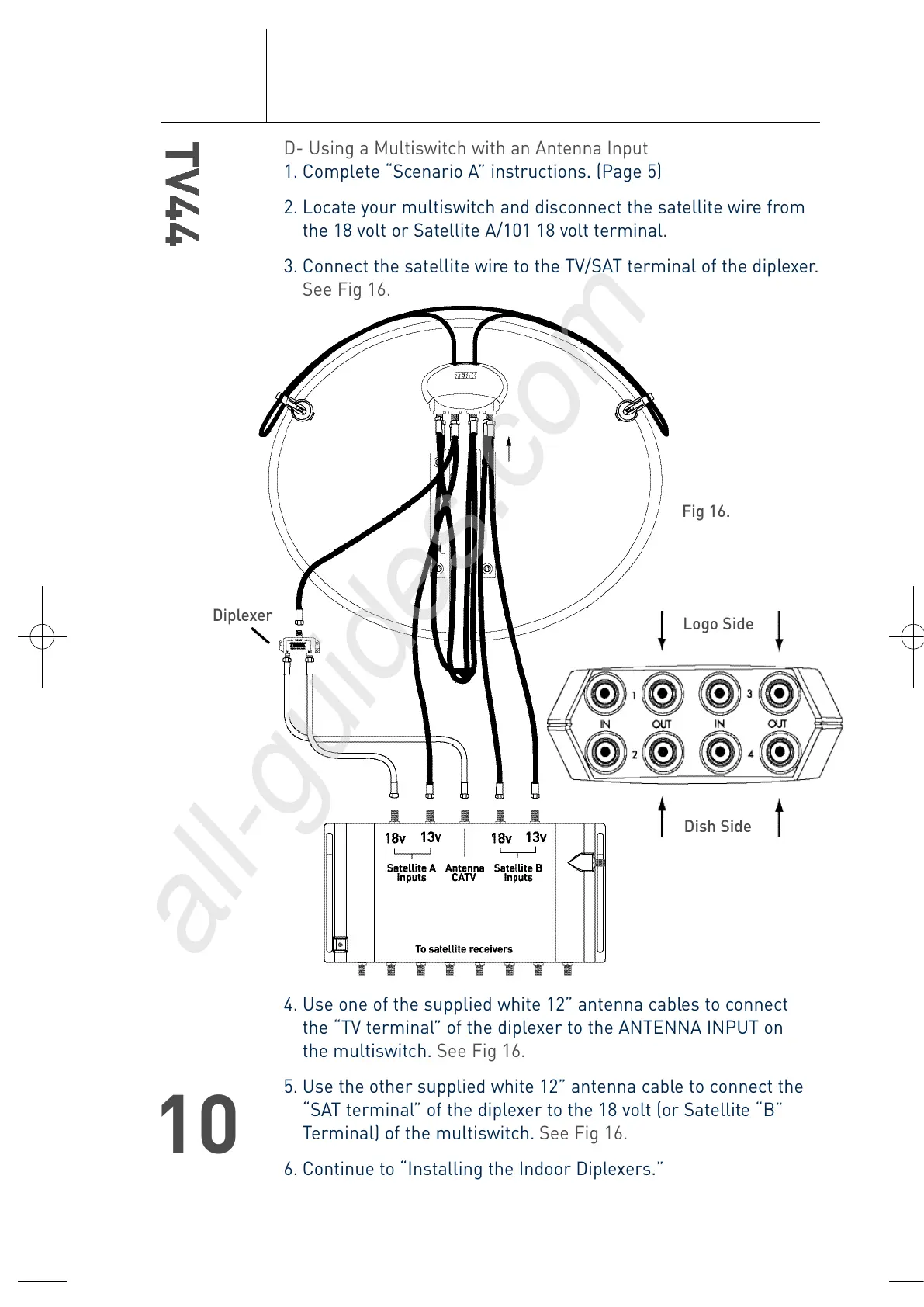
3. Connect the satellite wire to the TV/SAT terminal of the diplexer.
See Fig 16.
4. Use one of the supplied white 12” antenna cables to connect
the “TV terminal” of the diplexer to the ANTENNA INPUT on
the multiswitch. See Fig 16.
5. Use the other supplied white 12” antenna cable to connect the
“SAT terminal” of the diplexer to the 18 volt (or Satellite “B”
Terminal) of the multiswitch. See Fig 16.
6. Continue to “Installing the Indoor Diplexers.”
Diplexer
Logo Side
Dish Side
Fig 16.
T4-0048-TV44-OM.qxp 4/28/04 11:31 AM Page 10





 To Next Page