12
Installing the indoor diplexers
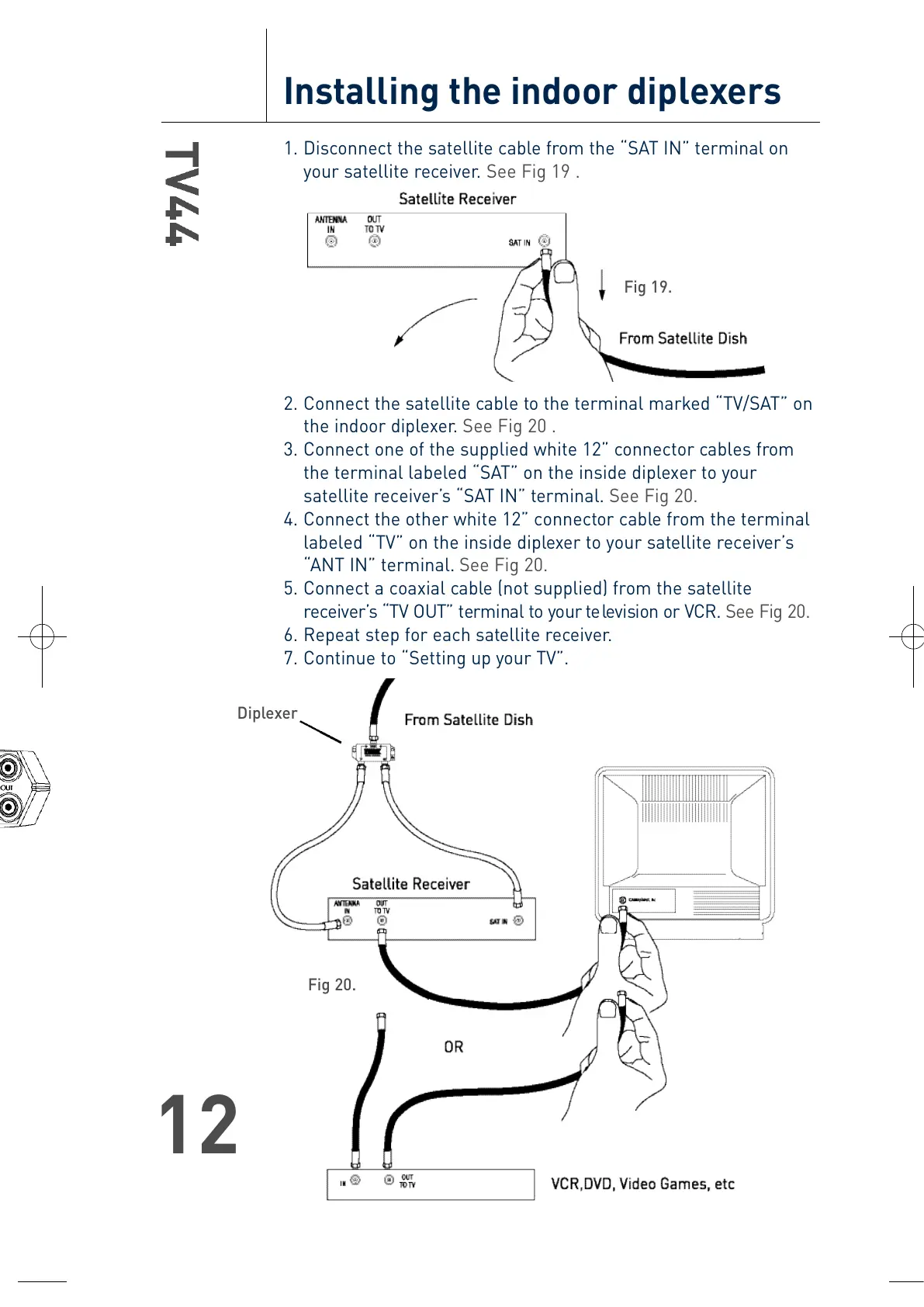
1. Disconnect the satellite cable from the “SAT IN” terminal on
your satellite receiver. See Fig 19 .
2. Connect the satellite cable to the terminal marked “TV/SAT” on
the indoor diplexer. See Fig 20 .
3. Connect one of the supplied white 12” connector cables from
the terminal labeled “SAT” on the inside diplexer to your
satellite receiver’s “SAT IN” terminal. See Fig 20.
4. Connect the other white 12” connector cable from the terminal
labeled “TV” on the inside diplexer to your satellite receiver’s
“ANT IN” terminal. See Fig 20.
5. Connect a coaxial cable (not supplied) from the satellite
re c e i v e r ’s “TV OUT” terminal to your te levision or VCR. See Fig 20.
6. Repeat step for each satellite receiver.
7. Continue to “Setting up your TV”.
Fig 19.
Fig 20.
Diplexer
T4-0048-TV44-OM.qxp 4/28/04 11:31 AM Page 12





 To Next Page