32
Switch the device ready
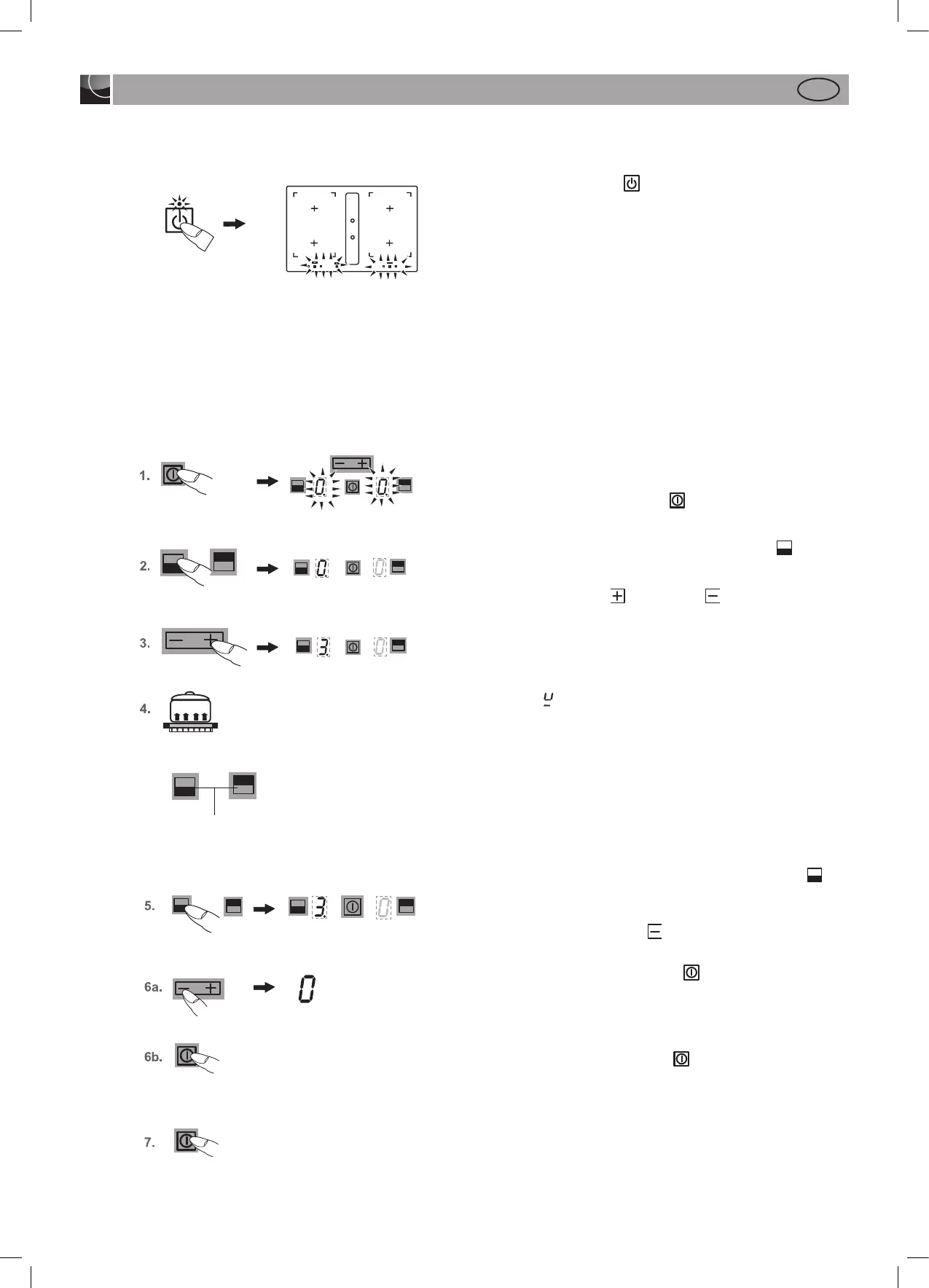
With the Standby key , the unit is switched operational. The
key is like the main switch. First there is a self-test of the controls
and then the indicators light up briefly.
After switching off using this button the unit remains about 120
min. in standby mode.
Attention! If the device is switched off completely, no more resi-
dual heat is displayed!
Operating the keys
The controls described here expect the pressing of a (selection)
key to be followed by the pressing of a subsequent key.
The next key will need to be pressed within 10 seconds, other-
wise the selection will be deleted.
The Plus / Minus keys can be touched individually or be perma-
nently pressed.
Switching on the hob and cooking zones
1. Press the ON/OFF key hob until the power setting dis-
play indicates 0. The controls are ready for operation.
2. Then press a cooking zone selection key (e.g.
for front).
The selected power setting display will light up brightly.
3. Use the Plus key or Minus key to select a power set-
ting. The Plus key will activate power setting 1 and the Minus
key power setting 9.
4. Immediately put cookware suitable for induction cooking
onto the cooking zone. The pan recognition device will ac-
tivate the induction coil. The pot or pan will be heated up.
The
symbol will appear until a metal cooking pot is pla-
ced onto the cooking zone.
If no pot is placed on the cooking zone it will switch off after
10 minutes for reasons of safety. Please observe the section
on “Pan recognition” here.
Repeat items 2 to 4 in order to cook on other cooking zo-
nes at the same time.
Switching off a cooking zone
5. Press the required cooking zone selection key (e.g. for
front). The selected power setting display will light up
brightly.
6. a) Press the Minus key
several times until the power set-
ting display shows 0, or
6. b) Press the ON/OFF key hob
The entire hob will be swit-
ched off (all the cooking zones are switched off).
Switching off the hob
7. Press the ON/OFF key hob The hob will be completely
switched off, irrespective of any settings.
Operation
Suitable for induction cooking
Cooking zone selection keys


 To Next Page