MIDI Master PRO Keyboard
17
8. Ten Numerical Keys & Enter button:
These buttons are used to enter the number of different parameter (for example, pro-
gram change #18). Be sure to enter all digits of the desired number in rapid succession
then press the enter key. If you make any mistake (For example, a number like 130 -
the number is too high / not possible) the cursor in the display will not show the number
that you are keying, please try again until you do the right procedure to enter a correct
number.
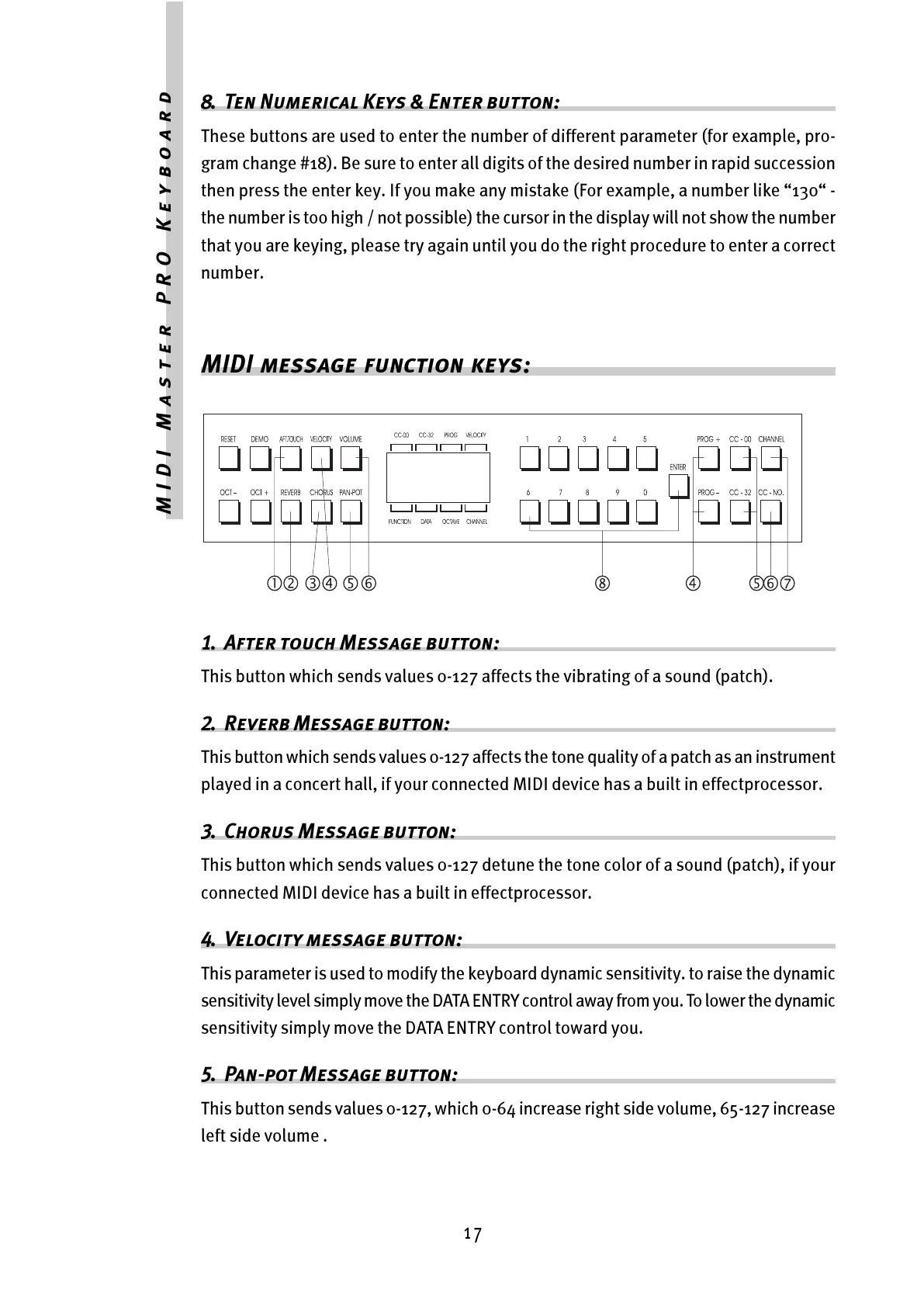
MIDI message function keys:
1. After touch Message button:
This button which sends values 0-127 affects the vibrating of a sound (patch).
2. Reverb Message button:
This button which sends values 0-127 affects the tone quality of a patch as an instrument
played in a concert hall, if your connected MIDI device has a built in effectprocessor.
3. Chorus Message button:
This button which sends values 0-127 detune the tone color of a sound (patch), if your
connected MIDI device has a built in effectprocessor.
4. Velocity message button:
This parameter is used to modify the keyboard dynamic sensitivity. to raise the dynamic
sensitivity level simply move the DATA ENTRY control away from you. To lower the dynamic
sensitivity simply move the DATA ENTRY control toward you.
5. Pan-pot Message button:
This button sends values 0-127, which 0-64 increase right side volume, 65-127 increase
left side volume .



 To Next Page