English - 33 -
For assistance, please call our Tesco Electrical Helpline on 0845 456 6767
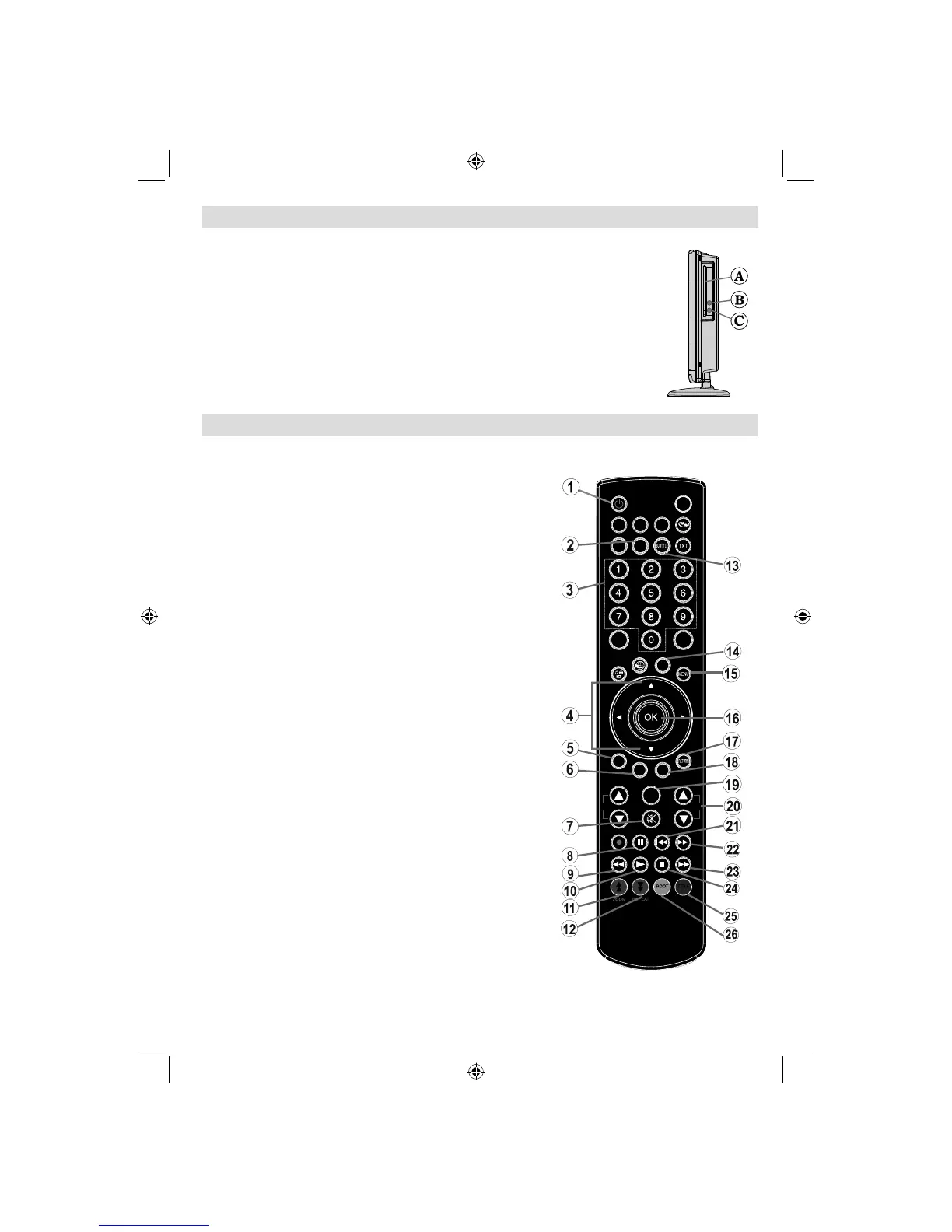
DVD Control Panel Buttons
A. Disc loader
B. Play / Pause
Plays/pauses the disc. When DVD menu (root menu) is active, this button functions as
“button select” (selects the highlighted item in menu) if this is not prohibited by the disc.
C. Stop / Eject
Stop playing disc / Eject or Load the disc Note:
• You cannot eject the disc via the remote control.
• While playing a fi le, you should press STOP button three times to eject.
Overview of the Remote Control
SLEEP
SCREEN
PRESETS
LANG.
FAV
EPG
SWAP
SOURCE
C
DISP.
SEARCH
MODE
INFO
CH
V
Standby1.
Language selection (Set language)2.
Numeric buttons3.
Navigation buttons (Up/Down/Left/Right)4.
Clear 5.
Display time / DVD menu6.
Mute7.
Pause8.
Rapid reverse9.
Play10.
Zoom11.
Repeat12.
Subtitle13.
AV / Source selection14.
Menu15.
OK 16.
Return17.
Search Mode18.
Info19.
Volume Up / Down20.
Skip Previous 21.
Skip Next22.
Rapid advance23.
Stop24.
Title25.
Root26.
Note: Buttons not indicated with a number are
not functional in DVD mode.
01_MB62_[GB]_(02-DVD)_WODIVX_1910UK_10076217_50202508.indd 3301_MB62_[GB]_(02-DVD)_WODIVX_1910UK_10076217_50202508.indd 33 05.11.2011 10:16:4005.11.2011 10:16:40



 To Next Page