English - 7 -
For assistance, please call our Tesco Electrical Helpline on 0845 456 6767
PC Input4. is for connecting a personal computer to the TV set.
Connect the PC cable between the PC INPUT on the TV and the PC output on your PC.
Note: You can use YPbPr to VGA cable(not supplied) to enable YPbPr signal via PC input.
S/PDIF Coaxial Out5. outputs digital audio signals of the currently watched source.
Use an SPDIF coaxial cable to trasfer audio signals to a device that has S/PDIF input
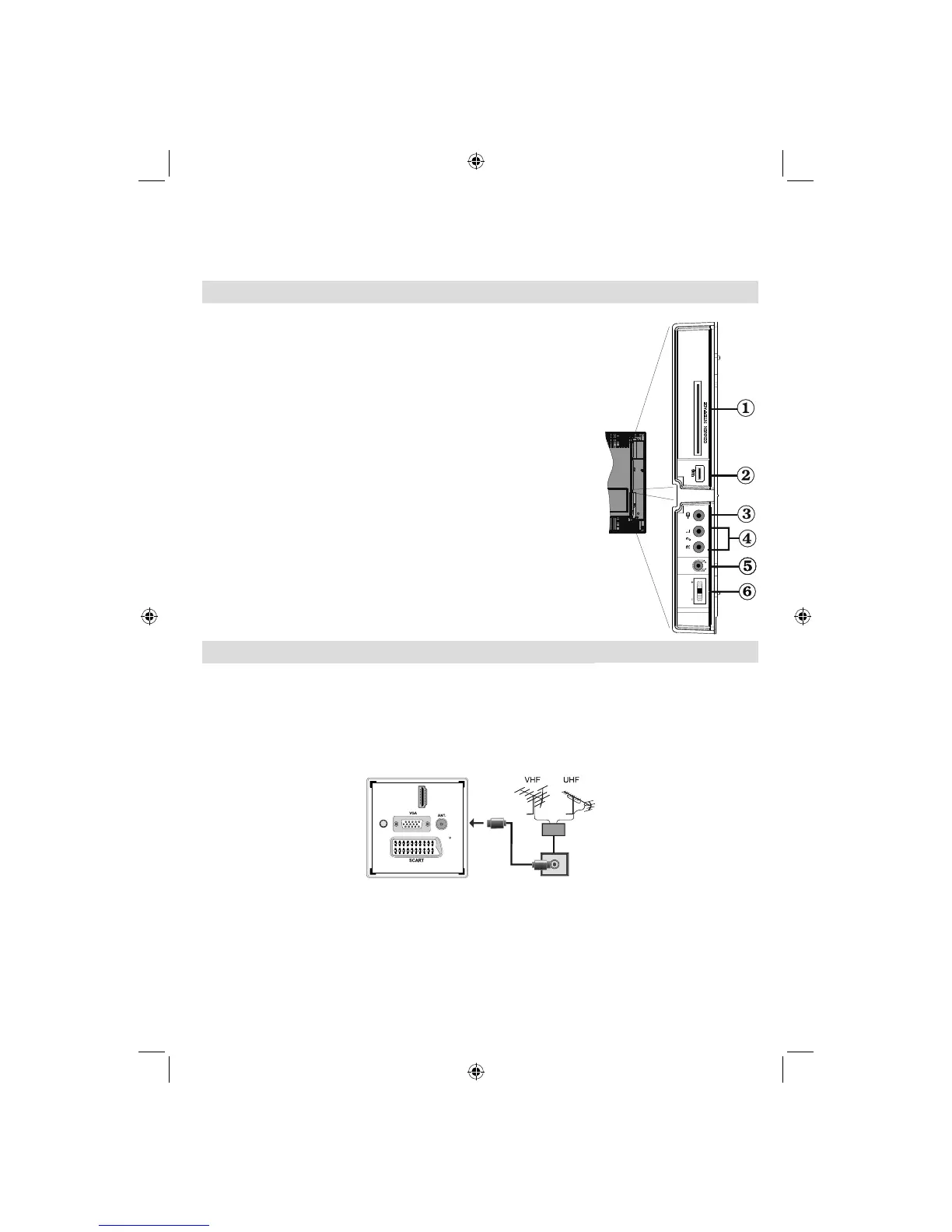
Viewing the Connections - Side Connectors
The CI Slot is used for inserting a CI card. A CI card allows you to 1.
view all the channels that you subscribe to. For more information, see
“Conditional Access” section.
Side USB input.2.
Video Input is used for connecting video signals of external devices.3.
Connect the video cable between the VIDEO IN socket on the TV and
the VIDEO OUT jack on your device.
Audio Inputs are used for connecting audio signals of external devices. 4.
Connect the audio cable between the AUDIO INPUTS on the TV and the
AUDIO OUTPUT jacks on your device.
Note: If you connect a device to the TV via the VIDEO INPUT, you should
also connect your device with an audio cable to the AUDIO INPUTS of the
TV to enable audio.
The headphone jack is used for connecting an external headphone to 5.
the system. Connect to the HEADPHONE jack to listen to the TV from
headphones.
Volume/ Programme/ Source and Standby-On switch6.
Power Connection
IMPORTANT: The TV set is designed to operate on 220-240V AC, 50 Hz.
After unpacking, allow the TV set to reach the ambient room temperature before you connect the set to the •
mains. Plug the power cable to the mains socket outlet.
Aerial Connection
Connect the aerial ,cable TV plug to the AERIAL INPUT socket located at the rear of the TV.•
HDMI 1
SPDIF
Coax.OUT
MODE
o
5Vdc-Max500mA
01_MB62_[GB]_(01-TV)_woypbpr_1910UK_IDTV_BRONZE19_22910W_10076217_50202508.indd 701_MB62_[GB]_(01-TV)_woypbpr_1910UK_IDTV_BRONZE19_22910W_10076217_50202508.indd 7 05.11.2011 10:17:5705.11.2011 10:17:57



 To Next Page