VCMC15 Vacuum Cleaner User Guide
Operating your Vacuum Cleaner
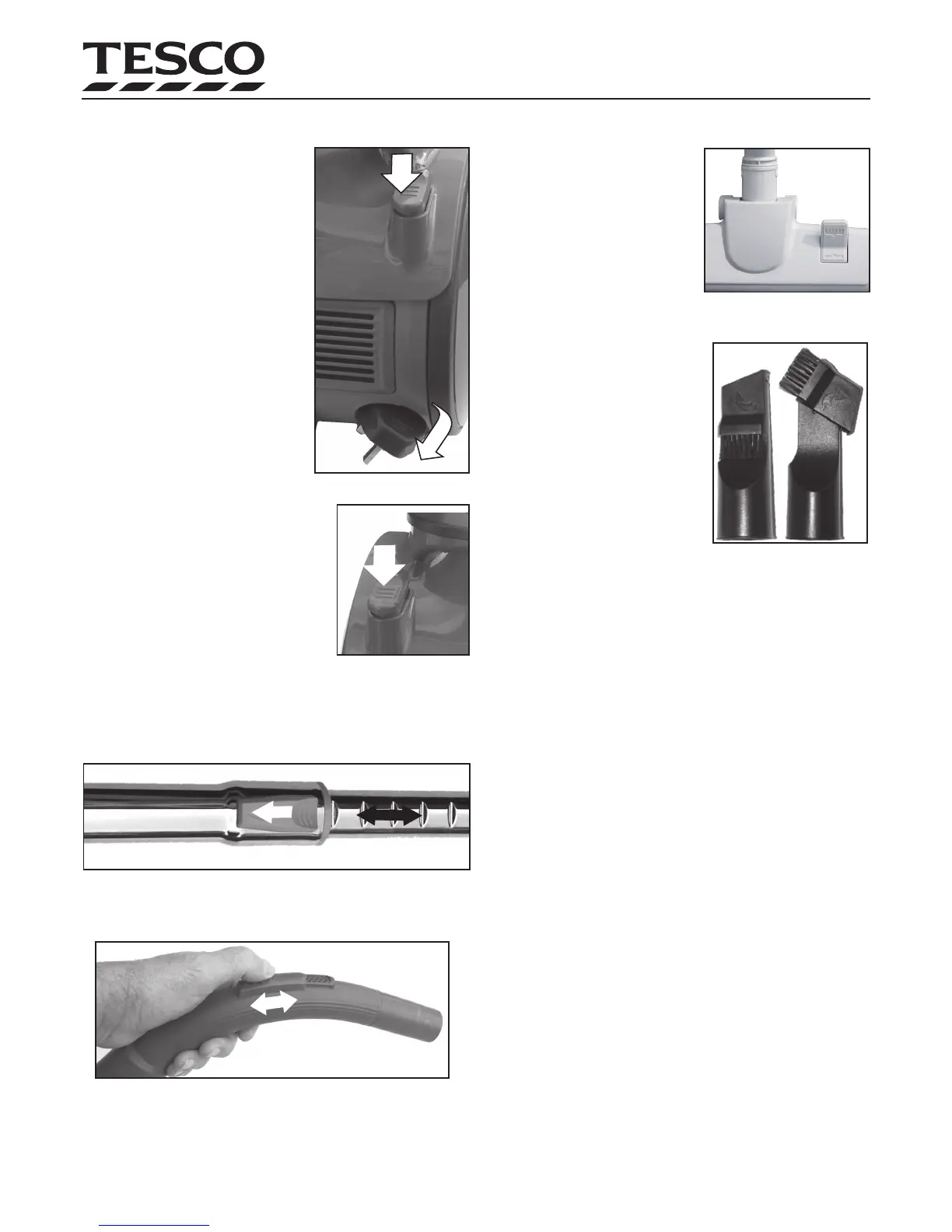
1: Extend the power cord:
Gently pull the cord from the recess
located in the rear of the cleaner. The cord
has two marks. The yellow mark shows
the maximum safe length to which you
can extend the cord. If you can see the
red mark the cord has been lengthened
too much. Never extend the cord beyond
the red mark or you may damage the cord
winding mechanism.
2: To rewind the cord:
Unplug the cord. Press the cord rewind
pedal as indicated. Gently guide the
cord by hand into the cleaner until it is
fully rewound. Do not let the cord return
unaided or it may whip and cause damage or injury.
3: Switch the Cleaner on
Press the Mains ON/OFF switch to switch the
cleaner ON. (Press again to switch the power
OFF)
4: Adjust the Extension Tube
The extending part of the tube is notched. Press the catch in. Holding
the catch in, adjust the tube in and out a suitable number of notches to
give you a comfortable working position. Release the catch and pull the
lower tube slightly to check that is securely held.
5: Adjust the Airow
The suction can be ne-controlled by moving the airow
slider in the hose handle.
When vacuuming:
Move the vacuum head back and forth over the surface. Use even
strokes. Do not press- let the cleaner do the work.
Using the Accessories
The Floor Brush
The Floor Brush can be used on carpets
or bare oors.
Bare Floors: Press the side of the lever
with the Brush Symbol. The brush will
appear .
Carpets: Press the side of the lever with the Floor symbol to retract the
oor brush.
The Crevice Tool
The Crevice Tool is a dual-purpose tool.
Use it extended to vacuum down the side
of cushions, etc. Turn the head through
90º to clean curtains, etc.
General Do’s and Don’ts
• Do NOT attach or remove accessories when the vacuum cleaner is
switched on.
• Do NOT pull the cleaner around the room by the hose.
• Do NOT over extend the hose. Trying to reach beyond the hose
length could cause an accident.
• Be especially careful on stairs.
• Do NOT pull or carry the cleaner by the cord, close a door on the
cord, or pull the cord around sharp edges or corners. Do not over
extend the cord. Switch the cleaner o and move it to a closer
power point. Use just enough cord to do the job.
• Use the carry handle to lift or move the cleaner. If you are moving
the cleaner a long way or up a ight of stairs, switch o, rewind
the power cord and park the accessories.
• Examine the dust level and empty the dust cup regularly.
• NEVER let the dust exceed the MAX level
Clearing a Blockage
If the cleaner loses suction this may be due to clogged lters or a block-
age. DO NOT operate the cleaner if the suction is impaired.
If you suspect a blockage: Switch o and unplug the cleaner imme-
diately. Empty the dust, check all the lters and clean them.
If this does not remove the blockage: Check the hose, extension
tube and accessories visually and remove any blockage with a stick or
broom handle.
Page 5
1
2


 To Next Page