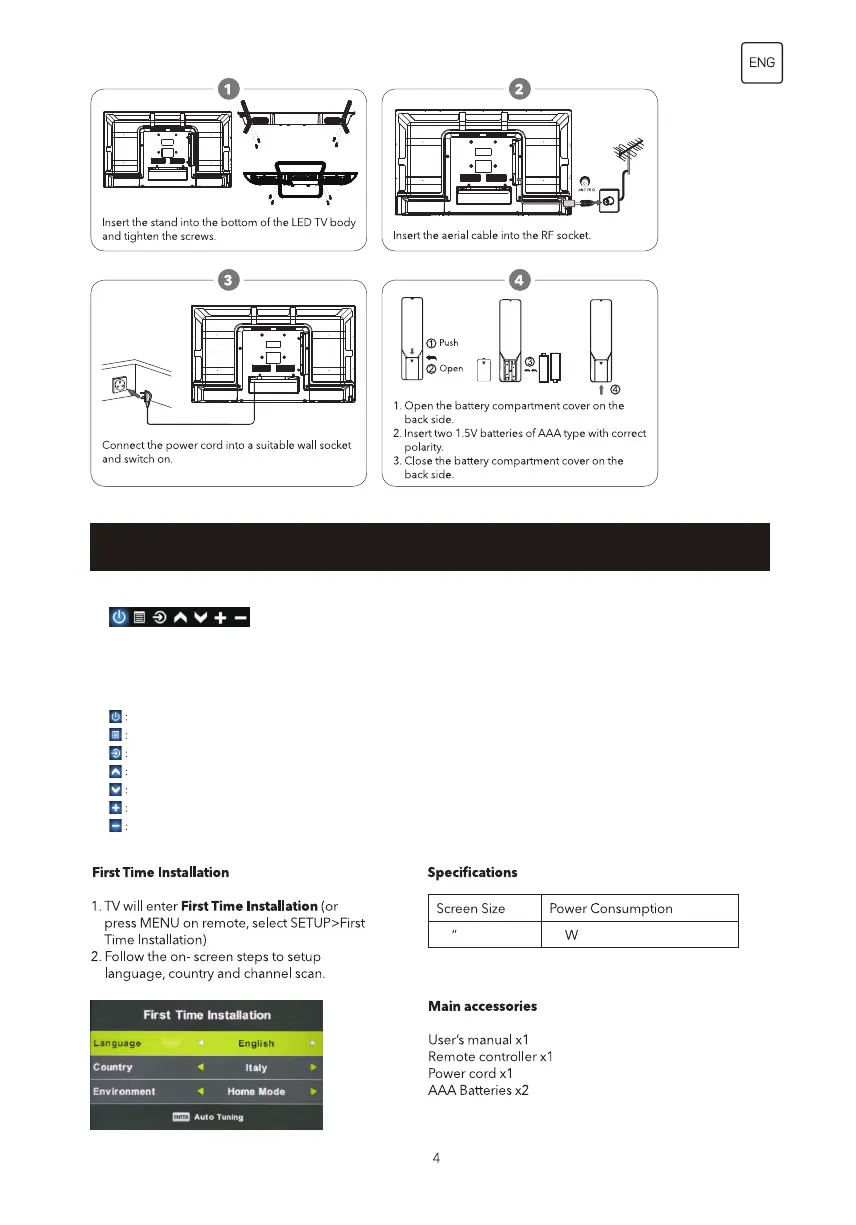
5632
Power off Icon: Corresponding to the “POWER ‘botton of remote.
Menu Icon: Corresponding to the “MENU” button of remote.
Source Icon: Corresponding to the “SOURCE” button of remote.
CH+ Icon: Corresponding to the “CH+” button of remote.
CH- Icon: Corresponding to the “CH-” button of remote.
Volume+ Icon: Corresponding to the “Volume+ ” button of remote.
Volume- Icon: Corresponding to the “Volume- ” button of remote.
TV Buttons And Terminal Interface
TV Buttons
Display/Hide Key Icon: When there is no button icon popping up,press the key, they key icon will pop
up like the picture shows above, the key icon will automatically turn off after 5 seconds of inactivity.
Icon selection: Short pres the button, move the loop to the right, select the icon.
Icon function selction: Long press the key to achieve the fuction of the selected icon.
Icon Descpription:


 To Next Page