4
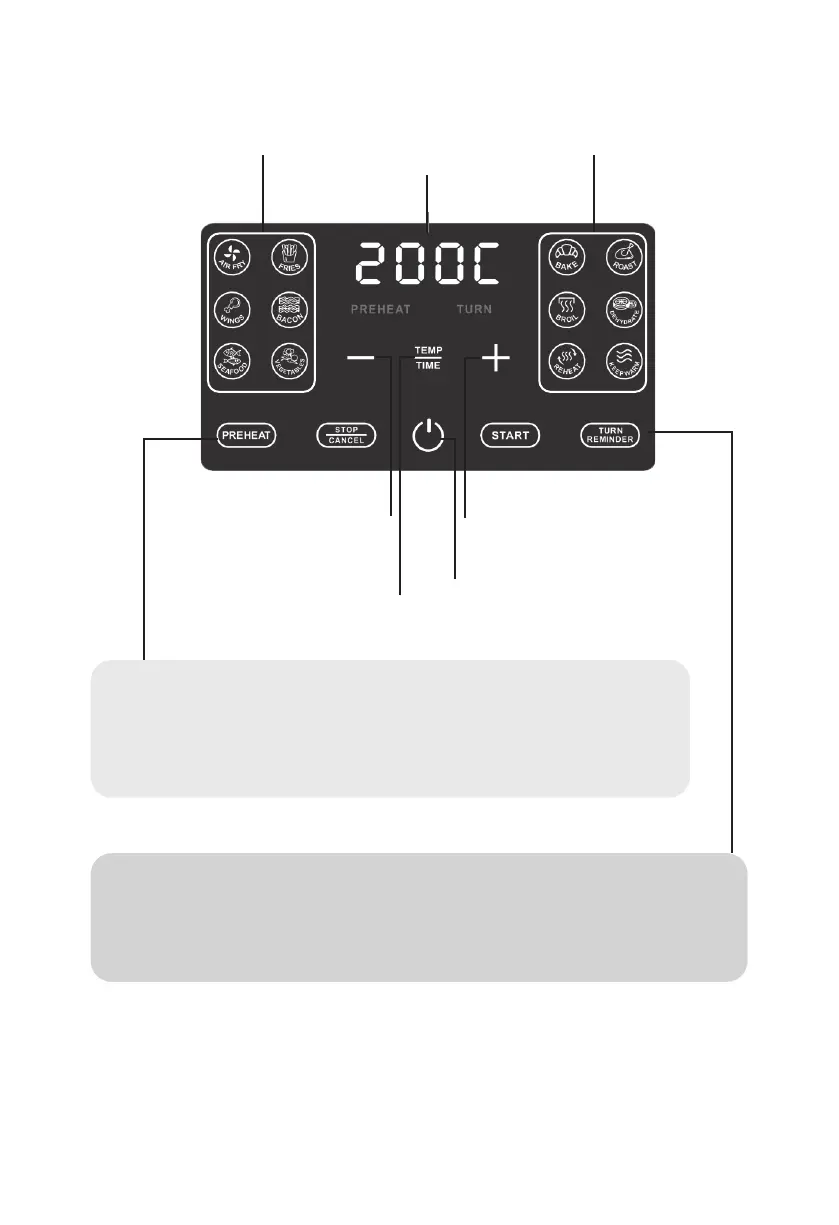
DISPLAY AND CONTROL PANEL
Air Fry
Presets
Decrease
Temperature / Time
Toggle between adjusting
Temperature / Time
Power Icon
Increase Temperature
/ Time
Cooking
Presets
Temperature
/ Time
See the chart for Presets that have Preheat and Turn Reminder on by default and those that have the option to toggle the
settings on and off.
PREHEAT
Preheating the air fryer before adding food will generally deliver the best results. When
cooking multiple batches in a row, only preheat before the first batch.
Tap PREHEAT before START to enable or disable preheating. When preheating is enabled,
PREHEAT appears in red on the Display.
TURN REMINDER
Turning or tossing food halfway through cook time will deliver evenly browned and crispy results.
Tap TURN REMINDER before START to enable or disable Turn Reminder.
When Turn Reminder is enabled, TURN appears in red on the Display.



 To Next Page