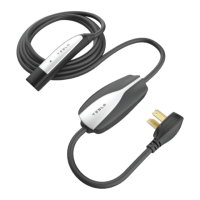
The Corded Mobile Connector is an essential accessory for charging Tesla vehicles, designed for convenience and reliability. Its primary function is to facilitate the charging of a Tesla vehicle by connecting it to a standard power outlet. This device is specifically engineered for Tesla vehicles (excluding the Tesla Roadster) and is intended for use with vehicles that do not require ventilation during charging.
Function Description
The Corded Mobile Connector acts as an intermediary between a power source and your Tesla vehicle's charge port. It draws alternating current (AC) from a wall outlet and converts it into a suitable form for the vehicle's battery, enabling efficient and safe charging. The device incorporates a controller that manages the charging process, ensuring optimal power delivery and protecting against electrical issues. Status lights on the controller provide visual feedback on the device's operational state, indicating whether it is powered on, in standby, or actively charging. In the event of an error, these lights also serve as diagnostic indicators, helping users identify and troubleshoot potential problems. A built-in reset button allows users to clear certain error conditions and restart the charging process if necessary.
Usage Features
Using the Corded Mobile Connector is straightforward, designed for ease of use in various settings. To begin charging, the wall plug end of the connector is inserted into a compatible power outlet. It is crucial to ensure that the adapter is fully inserted into the outlet for a secure connection. Once the connector is plugged into the wall, the next step involves opening the vehicle's charge port door. This can be done by pressing the button located on the top of the Corded Mobile Connector handle when the vehicle is unlocked and a key is nearby. Alternatively, the charge port door can be opened via the vehicle's touchscreen, the Tesla mobile app, or by holding down the rear trunk button on the key fob for 1-2 seconds (for vehicles with a motorized charge port door).
After the charge port door is open, the handle of the Corded Mobile Connector is plugged into the vehicle's charge port. Upon successful connection, the charge port indicator light on the vehicle will pulse green, signifying that charging is in progress. The vehicle's display will also show charging information, which turns off after all doors are closed and the vehicle is locked. The Corded Mobile Connector's green status lights will stream continuously, confirming active charging.
Unplugging the connector is equally simple. Once charging is complete, the charge port indicator light on the vehicle will stop pulsing and turn solid green. To disconnect, the vehicle must be unlocked or recognize a nearby key to prevent unauthorized unplugging. The user then presses and holds the button on the Corded Mobile Connector handle until the charge port indicator light turns white, and then pulls the handle out of the charge port. The latch in the charge port retracts, stopping power supply, allowing for safe disconnection. The charge port door will automatically close after the cable is removed, though some vehicles may require a manual push to close the door if not equipped with a motorized charge port door.
For optimal longevity and to reduce wear and tear, Tesla recommends leaving the Corded Mobile Connector plugged into the wall outlet when not in use. However, if the device will not be used for an extended period, such as during a vacation, it should be unplugged and stored in an appropriate location.
Maintenance Features
The Corded Mobile Connector is designed to be a durable and low-maintenance device. It is not user-serviceable, meaning that users should not attempt to disassemble, repair, tamper with, or modify the connector. Any repairs or modifications should be handled by Tesla service.
Regarding cleaning, it is important to avoid using cleaning solvents on any of the connector's components. Instead, the exterior of the Corded Mobile Connector, including the charging cable and the connector end, should be periodically wiped with a clean, dry cloth. This helps to remove accumulated dirt and dust, ensuring the device remains in good condition and operates effectively. Proper positioning of the charging cable is also a key aspect of maintenance; it should be placed in a way that prevents it from being stepped on, driven over, tripped on, or subjected to any form of damage or stress. Adhering to these simple maintenance guidelines will help preserve the functionality and lifespan of the Corded Mobile Connector.


 To Next Page
 General