211
RO
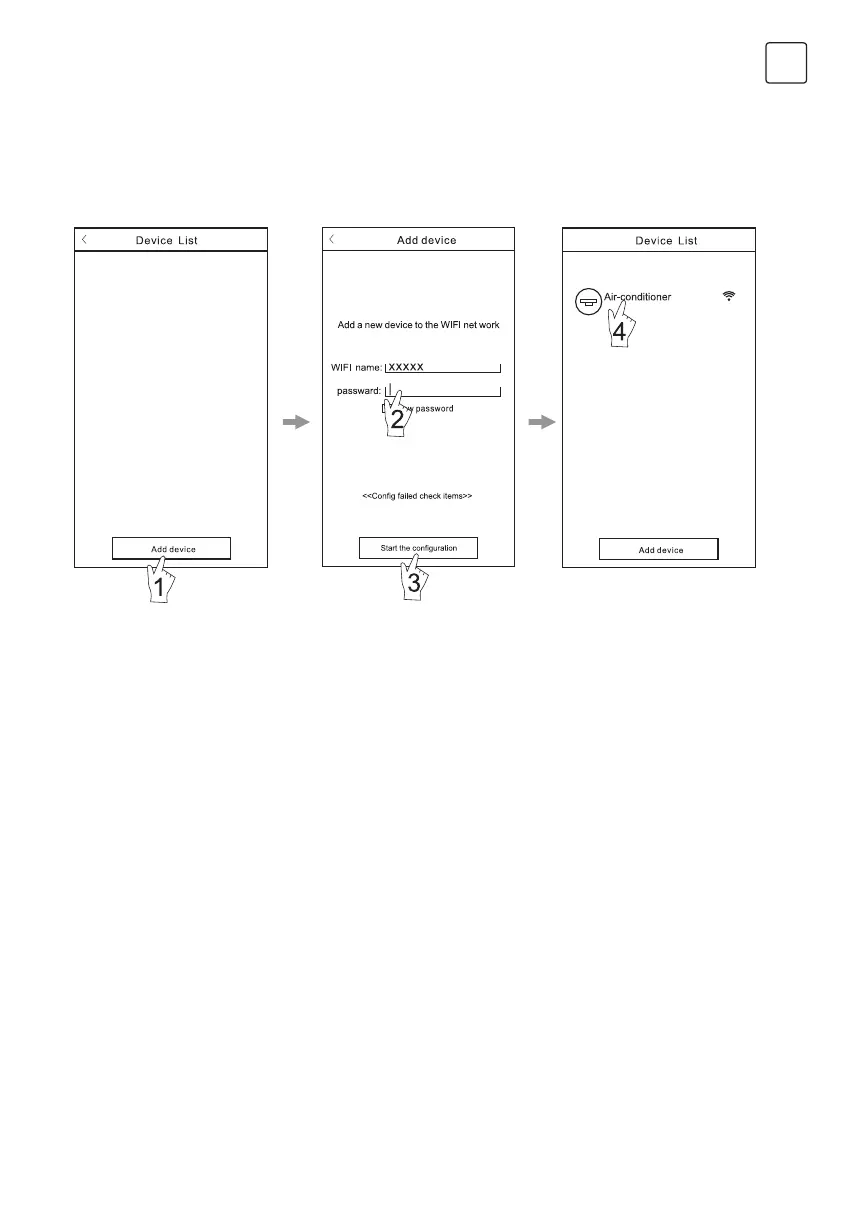
Dupa ce software-ul este descarcat si instalat pe terminalul mobil, configurati AC-ul conform imaginilor de mai jos:
Configurarea dispozitivelor
Nota:
1. In caz ca faceti pentru prima data configurarea sau daca schimbati routerul wireless, asigurati-va ca terminalul
mobil este deja conectat la reteaua WI-FI.
2. Daca configurarea esueaza, apasati “Config failed check items” pentru a vedea care au fost motivele si pentru
a reconfigura AC-ul.
Dupa ce ati configurat AC-ul apasati numele corespunzator al AC-ului pentru operatiuni viitoare.
Figura 6
Activate the control software
and click “Add device”within
30 minutes after the WIFI
module is reset.
The Wi-Fi name will
automatically appear in “Wi-Fi
name”. Enter the password of
the Wi-Fi and click “Start the
configuration”.
Once the configuration
is complete, the “Device
List” interface will be
automatically returned to and
the conFigurad the AC can
be seen.



 To Next Page