27
ENG
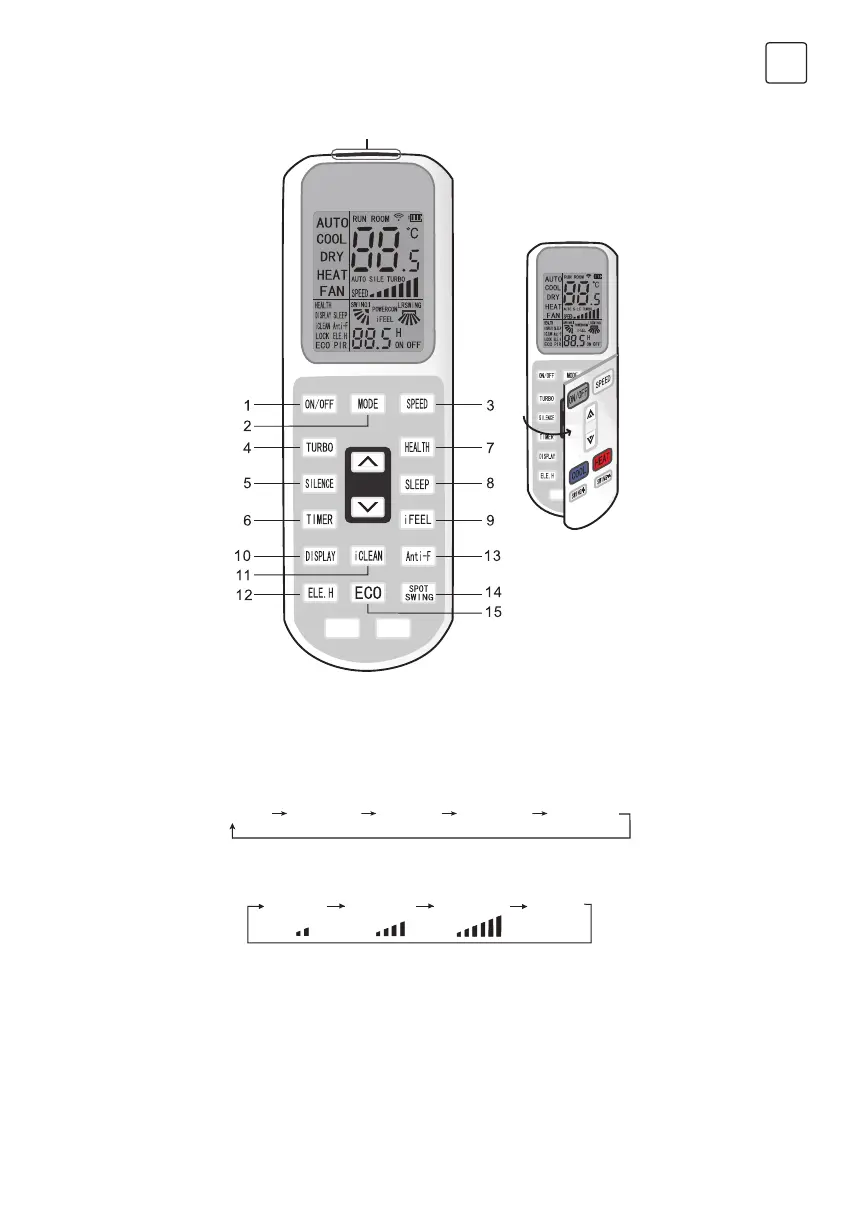
Remote controller inside
Signal transmitter
Open it from left to right
1. ON/OFF button
Press this button,the unit will be started or stopped, which can clear the timer or sleeping function of last time.
2. MODE button
Press this button, the running mode will change as below:
AUTO COOL DRY HEAT FAN
Note: Cooling only unit has mo heating function.
3. SPEED button
Press this button,speed will change as below:
Low Mid High Auto
4. TURBO button
• Set turbo on or off(the characters of turbo will appear or disappear)by pressing this key under cooling or
heating mode.
• Once energized, the unit will be defaulted to be turbo off.
• This function can not be set under auto, dry or fan mode, and characters of turbo won’t appear.
5.
SILENCE button
• Set silence on or off(the characters of silence will appear or disappear)by pressing this key.
• Once energized, the unit will be defaulted to be silence off.



 To Next Page