English
English
Instructions for use
06
~
~
~
~
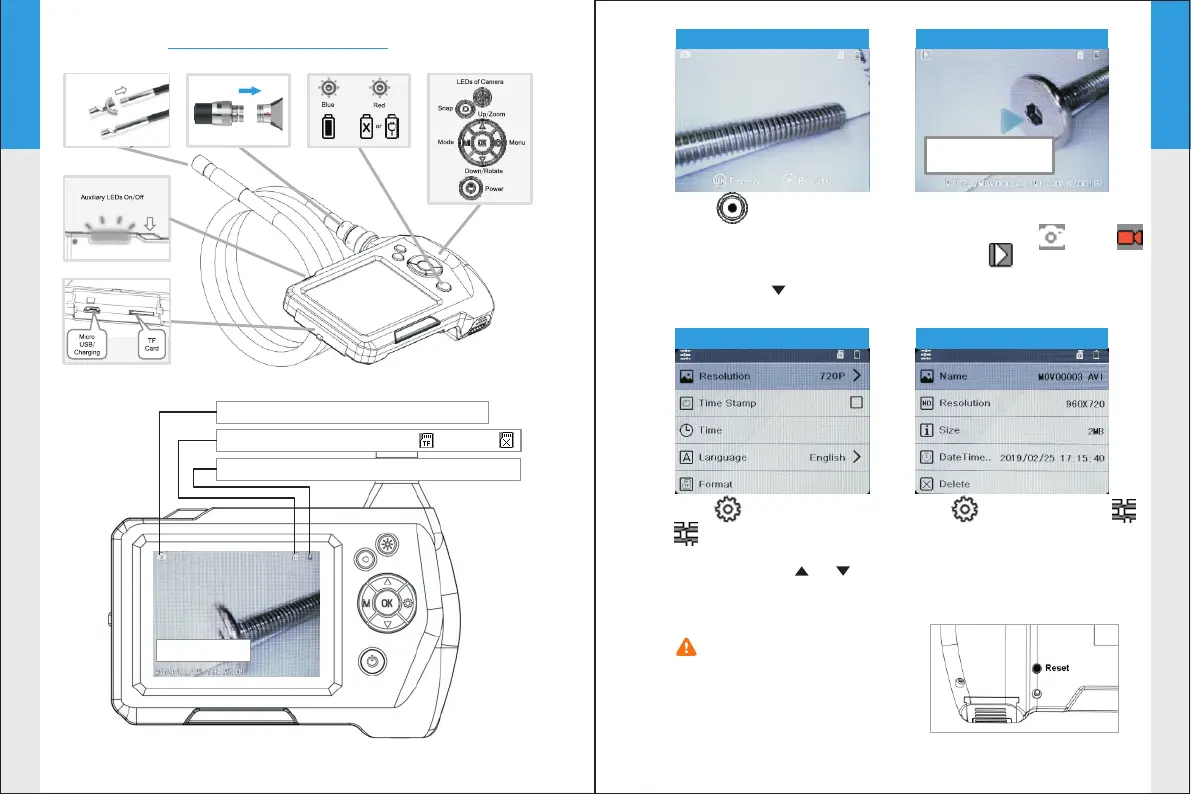
Mode: Take Photo /Record Video/Playback
Battery Status: Full/Middle/Low/Empty
TF Card Status: Card Plugged in / No Card
Time and Date
Please press the reset
button on the back of the
device if the screen freezes
or the buttons does not respond.
05
~
~
~
~
Click in Photo/Video
mode to snap photos or
record movie clips.Press
“OK” button to freeze the
screen and “ ” button
to Rotate screen.
Click “M” button to switch
the mode Photo Video
Playback
Click to enter Settings
in Photo and Video mode
to change the system
settings.Click “ ” “ ”
button to select and “OK”
button to save changes.
Photo-taking mode
Playback mode
System settings menu
Playback menu
Click to enter Settings
in Playback mode to see the
property information of the
media files or delete them.
File Type/File Name
/File number


 To Next Page