Operation
Testboy
®
TV 328 41
ENGLISH
Thermal Bridge Mode
Thermal bridge mode compares the surface temperature
with the ambient temperature. If the temperature difference is large enough,
the LED above the display will change from green to either yellow or red to
indicate the possible presence of a thermal bridge.
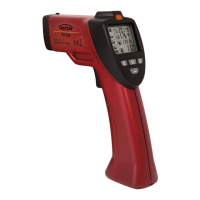
To active thermal bridge mode, press the button to enter thermal
bridge mode.
Point the instrument at the object and hold down the
trigger. The laser pointers will activate showing the area in which the infrared
sensor can see.
The display will show the current surface
Temperature
of the object within the measurement spot along
with the ambient temperature
. After releasing the trigger the display
will hold the current measurement.
The LED above the display will indicate the possible presence of a thermal
bridge.
► Green: Low temperature difference. No thermal bridge detected.
► Yellow: Medium temperature difference. Possible thermal bridge
present. Check again at a later time to verify.
► Red: High temperature difference. Thermal bridge detected. The
display will flash the surface temperature icon.
Check the insulation if a thermal bridge is detected.


 To Next Page