
 Need help?
Do you have a question about the Tetra TMR880i and is the answer not in the manual?
Defines key terms like EMC and ESD used in the guide.
Provides contact information for support regarding the installation guide.
Describes the available operation modes: Trunked and Direct.
Lists the frequency bands for TETRA radio equipment.
Specifies the output power compliance.
States the receiver class.
Details the durability of the control unit.
Specifies the operating voltage range.
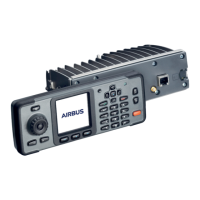
Provides physical dimensions and weight for the control and radio units.
Lists the available interfaces for external connections.
Describes the display specifications.
Details the keypad layout and functions.
Specifies current consumption in different modes.
Describes the typical contents of a radio sales package.
Details the components of the CUR-3 control unit sales package.
Advises reading installation guidelines for proper functionality.
Details the speaker microphone cable and its connector.
Describes the system connector and its pin layout.
Explains the control unit interface connector and its pin layout.
Details the auxiliary accessory connector and its pin layout.
Describes the external smart card connector.
Explains the active GPS antenna connector.
Details the TETRA antenna connector.
Describes the smart card connector.
Introduces the helmet installation cable and its purpose.
Presents the circuit diagram for helmet cable connections.
Provides detailed descriptions of the helmet interface.
Provides overall technical specifications for the helmet cable installation.
Lists speaker microphones, HF microphones, loudspeakers, and handsets.
Details system, installation, helmet, data cables, and connectors.
Lists power supplies and various antenna types.
Covers installation plates, brackets, covers, and fuses.
Provides instructions for assembling the CUR-3 unit.
Guides the installation of TMR880i using an installation plate.
Details the installation of CUR-3 into a DIN-slot.
Provides instructions for shortening installation cables.
Covers vehicle power distribution and grounding requirements.
Describes the system cable and its connections.
Explains the process of flashing and parametering the device.
Describes using the radio without the CUR-3 control unit.
Explains how to use different audio accessories.

 To Next Page
 General