8
Teufel · decoderstation 3
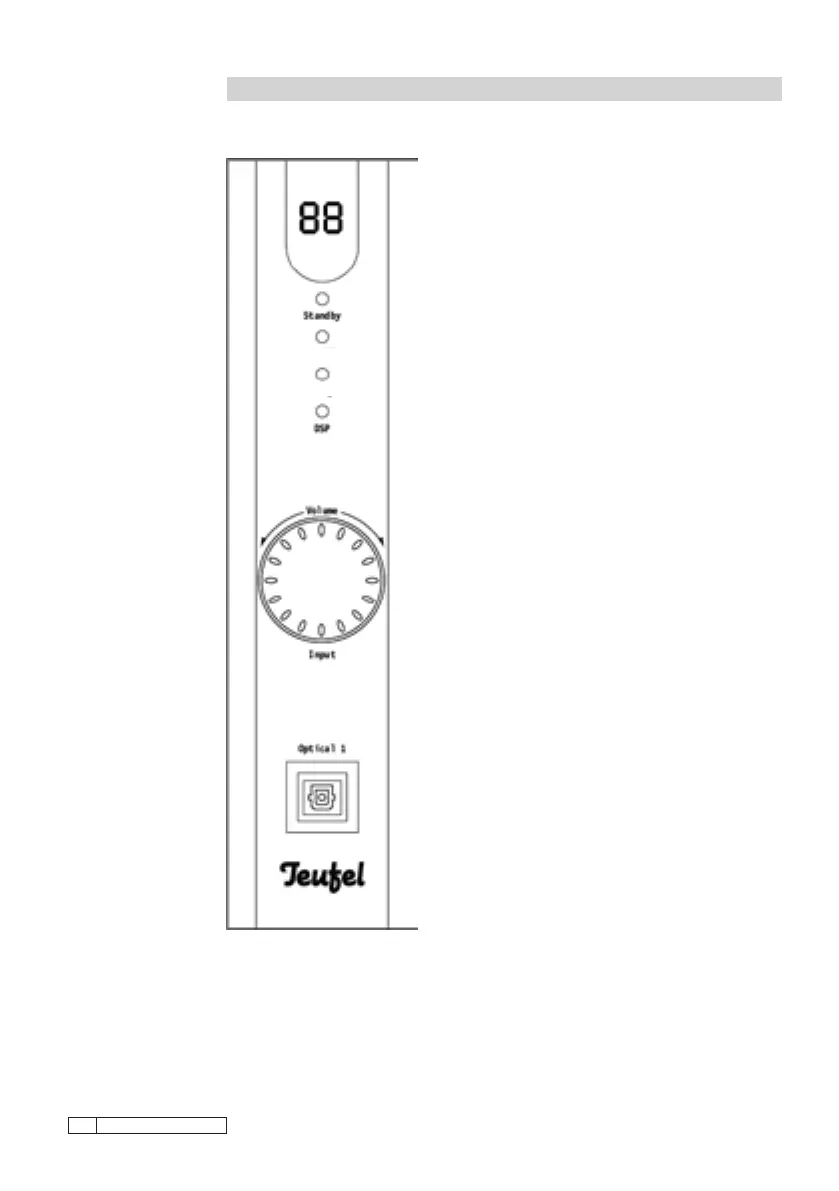
Display
The decoderstation 3 display is on the front top
edge. Various adjustment parameters can be
shown on this two-gure display.
During operating, the display always shows the
signal source – “O1” and “O2” (optical inputs), “CO”
(coaxial input) and “A1”, “A2” and “A3” (analogue
inputs). This display will change if you make any
changes, e.g. volume and then show the change
you have made.
Standby
The standby LED lights up to show that standby
mode is activated. The standby LED does not
light up if the mains plug has been disconnected
or the device is in operation.
Dolby Digital/DTS ·Dolby PLII · DSP
Using these three types of reproduction the
LEDs show the current operating mode. It should
be noted that only digital sources with the cor-
responding AC-3/DTS digital soundtrack can be
reproduced via the integrated digital decoder.
Only Pro Logic or DSP are available for analogue
stereo sources or digital formats that are not
present in AC-3 or DTS.
Volume
Use the dial control to increase or decrease the
volume by increments of 1dB (decibels) each.
The current volume setting can be seen on the
display. Volume can range between “00” (mute)
to “80” (maximum level). In the second mode,
the control can be pressed to select the signal
source.
Optical 1
For connecting the decoder with a digital signal
source in optical format (Toslink). The decoder-
station 3 is supplied with a suitable optical cable.
Function: Decoder front / display
Description of display and
operating elements on the
front of the decoderstation 3.
Dolby Digital/DTS
Dolby PLII



 To Next Page