NINGBO TEVERUN TECHNOLOGY CO.,LTD
Specification Model:UKC2
7
/
11
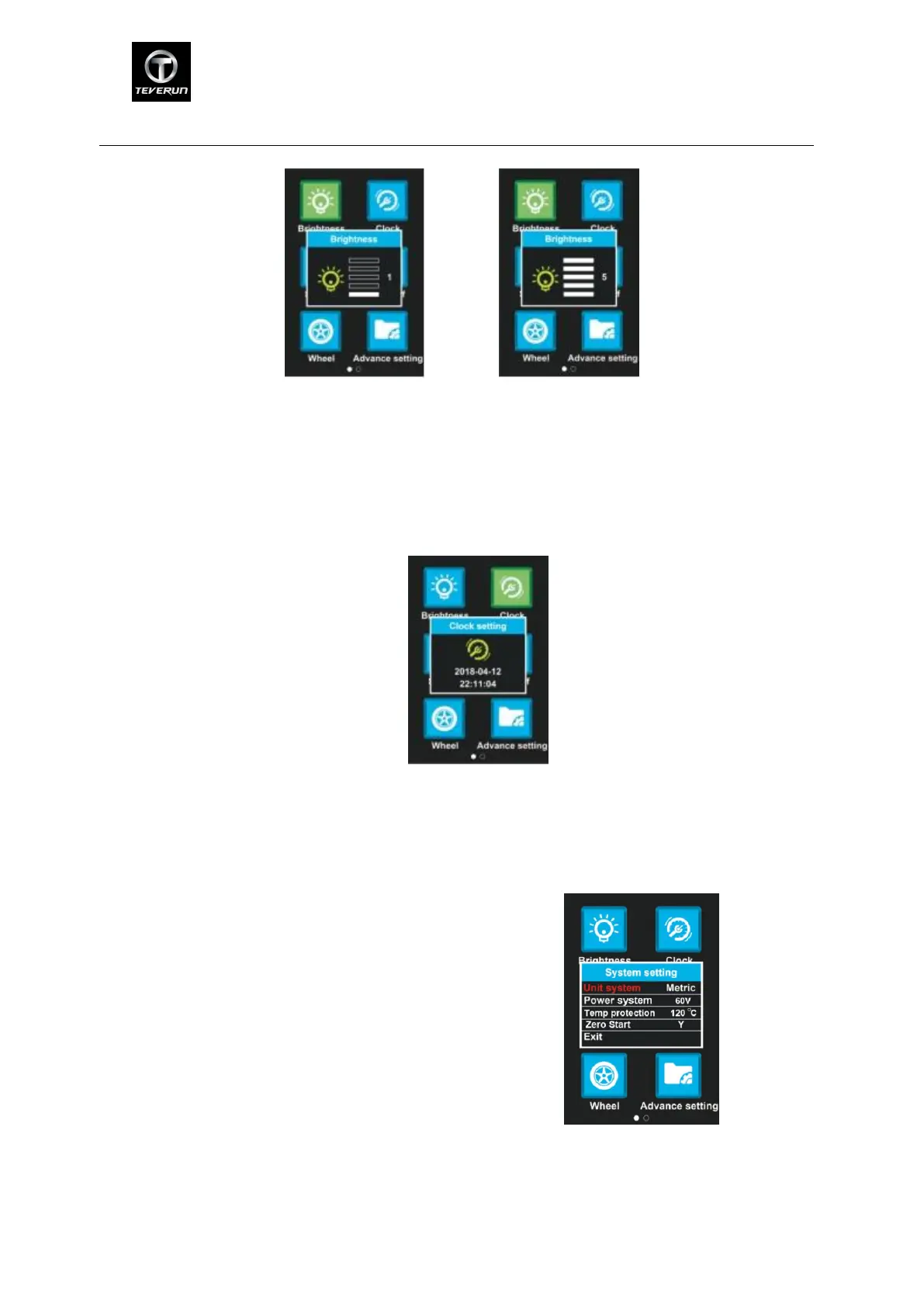
adjusting the brightness
8.2 Clock:Press M button to enter the clock setting menu. Press UP/DOWN button to set
Year/Month/Day/Hour/Min/Sec.When finish setting and press M button and return to previous
menu.
adjusting time
8.3 System setting:Press up/down button to switch different functions. Enter the option by
pressing M button and press up/down button again to switch functions. Press M button to
confirm current settings and press POWER button to cancel the setting and return to main menu.
Default and functions:
Unit system→Metric/Imperial
Power system→48V/52V/72V
Temp protection→80-130℃
Zero start→N/Y
After finishing setting,choose Exit to return to previous menu.
System options
8.4 Auto Off:Press UP/DOWN button to change the auto power off time. The number from 1 to
10 represents time (minutes) to shutdown and the default value is 10 minutes.


 To Next Page
 Loading...