6
Parts and Features (Cont.)
1
7
8
9
10
11
12
13
2
3
4
5
6
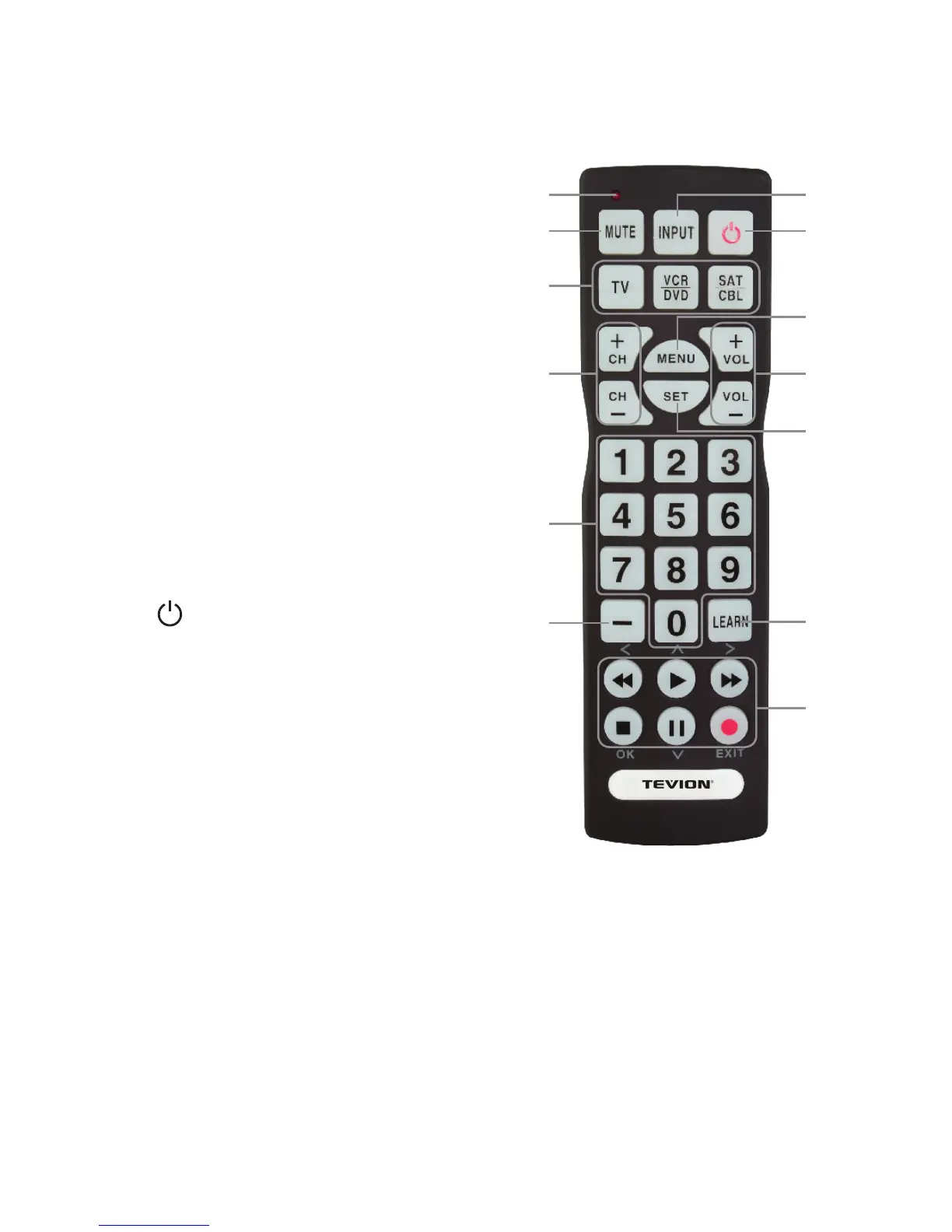
1. Red LED
2. MUTE
Turn o the sound.
3. DEVICE keys
Select a device to control.
4. CH+/CH-
Select the next or previous channel.
5. 0-9
Enter channels directly.
6. —
Access sub-channels on a TV
or receiver.
7. INPUT
Select the video input.
8.
Turn on or o a selected device.
9. MENU
• Display the menu for the selected device.
• In menus, activate and deactivate the
alternative function of the multifunction
keys.
10. VOL+/-
Adjust the volume.
11. SET
Activate setup for the remote.
12. LEARN
Press to enter learn mode.
13. Multifunction keys
• Control your VCR or DVD player.
• In menus, the keys stand for left (



 To Next Page