4
SET-UP
Unpacking and placing the unit
` Remove all packaging material including the trans-
port cardboard in the CD compartment.
ATTENTION!
To avoid danger of suffocation, do not let
young children play with plastic bags!
Place the unit on a flat, firm surface. Make sure that
the ventilation slots at the rear are not covered in or-
der to guarantee sufficient ventilation;
no strong heat affects the unit;
the unit is not exposed to direct sunlight;
the unit does not come into contact with liquids, in-
cluding dripping or splash water.
Connecting the power
AC power supply
` Connect the AC plug to an easily accessible AC outlet
120 V ~ 60 Hz. To avoid tripping, do not use an ex-
tension cord.
After connecting power the clock starts at
12:00. The
time flashes in the display until the time is set (see “Set-
ting the clock“).
Check the contents of the box
After unpacking the product, make sure that the following items are supplied:
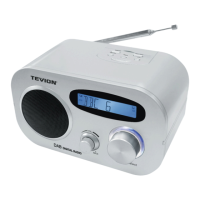
CD Clock radio unit
Instruction manual
CD-ClockRadio_MD4414_USA-rev.fm Seite 4 Freitag, 27. Juni 2003 10:07 10


 To Next Page
 Loading...