EasyManua.ls Logo

Texas Instruments 99/4A - Page 116

Texas Instruments 99/4A
146 pages
Print Icon
To Next Page IconTo Next Page
To Previous Page IconTo Previous Page
Loading...
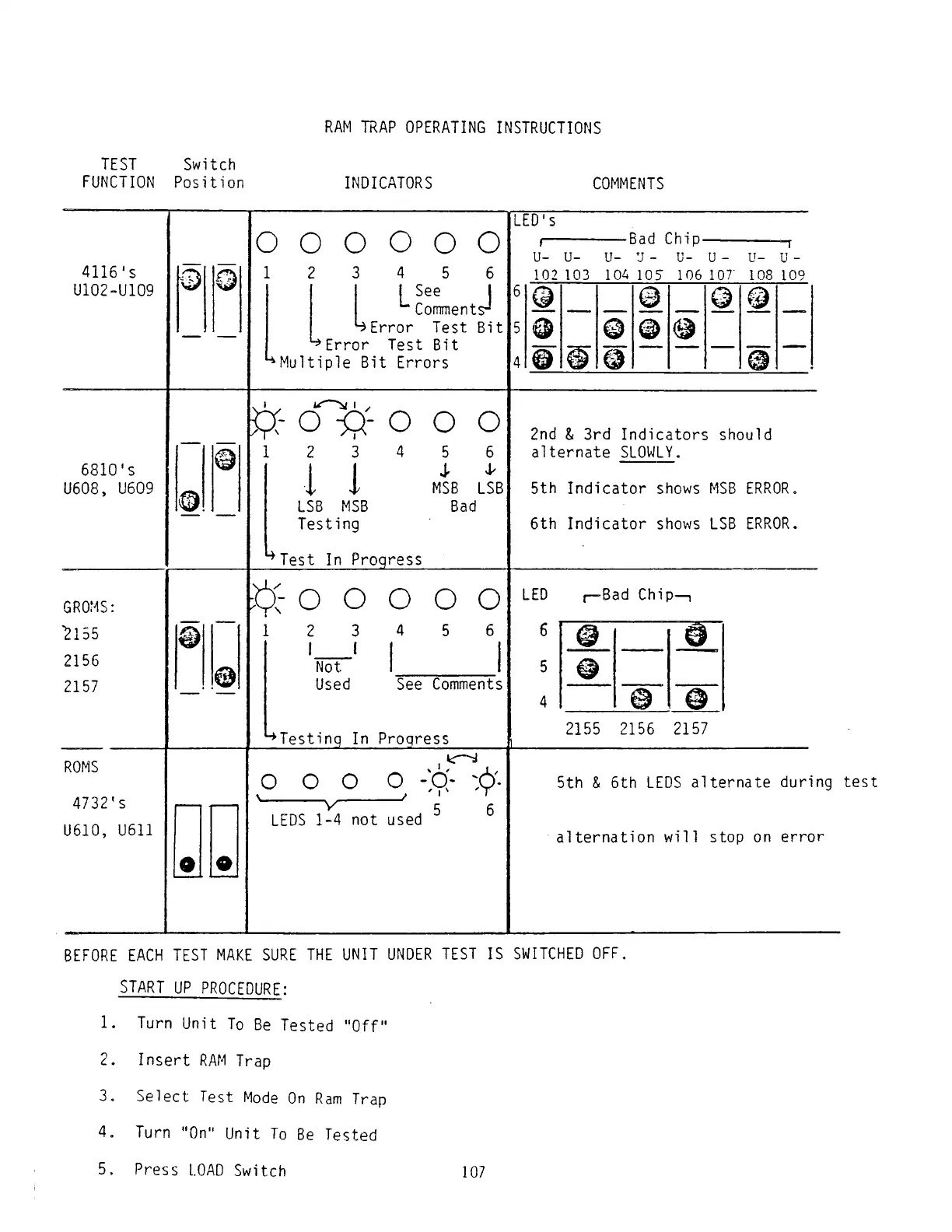
RAM
TRAP
OPERATING
INSTRUCTIONS
TEST
Switch
FUNCTION
Position
INDICATORS
COMMENTS
4116'
s
U1O2-U1O9
1
2
3
4
5
6
L
See
I
Comments-
1
1.
Turn
Unit
To
Be
Tested
"Off"
2.
Insert
RAM
Trap
3.
Select
Test
Mode
On
Ram
Trap
4.
Turn
"On"
Unit
To
Be
Tested
5.
Press
LOAD
Switch
107
Error
Test
Bit
Error
Test
Bit
^Multiple
Bit
Errors
Bad
Chip
-----------------
n
LED's
6810's
U608,
U609
1®
_
1
1
__
©1
T
6^-
o
o
o
1
2
3
4
5
6
II
1
1
MSB
LSB
LSB
MSB
Bad
Testing
Mest
In
Progress
2nd
&
3rd
Indicators
should
alternate
SLOWLY
.
5th
Indicator
shows
MSB
ERROR.
6th
Indicator
shows
LSB
ERROR.
^Testing
In
Progress
2155
2156
2157
ROMS
4732's
U610,
U611
o
o
o
o
-'o?
\
___ ____
/
1
*
5
6
LEDS
1-4
not
used
5th
&
6th
LEDS
alternate
during
test
alternation
will
stop
on
error
BEFORE
EACH
TEST
MAKE
SURE
THE
UNIT
UNDER
TEST
IS
SWITCHED
OFF.
START
UP
PROCEDURE
:

Related product manuals