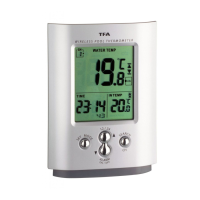
MIAMI – Wireless pool thermometer
MIAMI – Wireless pool thermometer
1918
• The temperature measured by the sensor is shown on the display of the display unit. If
you have installed more than one transmitter, press “SEARCH/CH” button to change
between the outdoor transmitters.
• You can also choose an alternating channel display. Press “SEARCH/CH” button. After
the last registered channel a circle symbol appears (Display for channel 1, for
channel 2 or for channel 3 and for alternating channel).
• To cancel an unused channel hold “SEARCH/CH” button for 3 seconds. If a new channel
is received it will be automatically registered again.
9. Positioning of basic unit and transmitter
• The pool sensor floats on the water surface and measures the temperature in a water
depth of about 100 mm. You can fix the pool sensor by a fastening rope.
• Place the basic unit at the final position. Avoid the vicinity of any interfering field like
computer monitors or TV sets and solid metal objects.
• Check the transmission of the signal from the transmitter to the basic unit (transmis-
sion range 30 m free field, within ferro-concrete rooms, especially with metal parts,
the received signal is naturally weakened.
• If necessary chose another position for transmitter and/or display unit.
10. Care and maintenance
•
Clean the instruments with a soft damp cloth. Do not use solvents or scouring
agents.
• Please switch off the pool sensor (pressing “TX” button and ”°C/°F” button at the
same time) if not using it for a long time.
10.1 Battery replacement
• When the batteries in the pool sensor (channel 1) are used up, low battery icon
appears on the display of the main unit.
• Open the battery compartment of the transmitter (screwed). Insert two new batteries
1.5 V AA, observing the correct polarities.
• After successful installation screw up the battery compartment of transmitter carefully.
•
Please note:
When the batteries are changed, the contact between transmitter and receiver must
be restored – so always insert new batteries into both units or start a manual trans-
mitter search.
11. Troubleshooting
Problems Solution
No indication ➜ Ensure batteries polarity are correct
at the
basic unit
➜ Change batteries
No transmitter reception ➜ Check batteries of external transmitter
Display “---“ (do not use rechargeable batteries!)
➜ Restart the transmitter and the basic unit as per the manual
➜ Start manual search for the transmitter
➜ Choose another place for the transmitter and/or the basic
unit
➜ Reduce the distance between the transmitter and the basic
unit
➜ Check if there is any source of interference
Incorrect display ➜ Change batteries
➜ Press RESET button with a pin on the basic unit
12. Waste disposal
This product has been manufactured using high-grade materials and components which
can be recycled and reused.
Never dispose empty batteries and rechargeable batteries in household
waste.
Never dispose empty batteries and rechargeable batteries in household
waste. As a consumer, you are legally required to take them to your retail
store or to appropriate collection sites depending to national or local regu-
lations in order to protect the environment.
The symbols for the heavy metals contained are:
Cd=cadmium, Hg=mercury, Pb=lead
This instrument is labelled in accordance with the EU Waste Electrical and
Electronic Equipment Directive (WEEE).
Please do not dispose of this instrument in household waste. The user is obli-
gated to take end-of-life devices to a designated collection point for the dis-
posal of electrical and electronic equipment, in order to ensure environmen-
tally-compatible disposal.


 To Next Page
 Loading...