EasyManua.ls Logo

TFA 30.5021 - User Manual

TFA 30.5021
18 pages
Print Icon
To Next Page IconTo Next Page
Loading...
Kat. Nr. 30.5021
Bedienungsanleitung
Operating Instructions
Instrucciones para el manejo
Gebruiksaanwijzing
Mode d’emploi
Istruzioni
ROHS
TFA_No. 30.5021 Anleitung.bel 17.06.2010 10:57 Uhr Seite 1

Other manuals for TFA 30.5021

Question and Answer IconNeed help?

Do you have a question about the TFA 30.5021 and is the answer not in the manual?

Summary

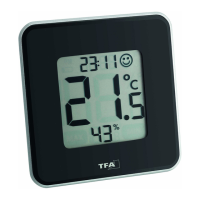
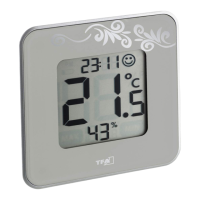
STYLE Digital Thermo-Hygrometer Functions and Introduction

Key Features and Capabilities

Details modern design, indoor climate control, comfort level, max/min values, and time display.

Product Introduction

Explains the STYLE Thermo-Hygrometer's role as an ideal instrument for monitoring room conditions.

Device Buttons Overview

Identifies the device's control buttons: SET, SWITCH, and MAXIMIN.

Device Housing and Initial Setup

Housing Components

Describes physical parts: wall mounting hole, removable stand, and battery compartment.

Initial Setup Guide

Instructions for initial device setup, including stand removal and battery compartment access.

Setting the Clock

Procedure to set the device's time using the SET and SWITCH buttons after battery insertion.

Display Settings and Information

Temperature Unit Selection

Guide on switching between Celsius (°C) and Fahrenheit (°F) for temperature display.

Viewing Max;Min Readings

Instructions to view and reset recorded maximum and minimum temperature/humidity.

Comfort Level Indicator

Explains the smiley icon indicating room comfort based on humidity levels.

Display Mode Options

How to use the SWITCH button to select large display of temperature or humidity.

Installation, Battery, and Maintenance

Positioning and Wall Mounting

Guidance on placing the instrument on a surface or mounting it on a wall.

Battery Replacement Procedure

Steps and safety precautions for changing the CR2032 button cell battery.

Device Maintenance Tips

Recommendations for keeping the instrument clean and in good working order.

Usage Guidelines and Technical Specifications

Usage Guidelines and Safety Warnings

Details proper use, safety warnings, and warranty implications for misuse.

Technical Specifications

Lists technical data: temperature/humidity ranges, precision, resolution, and battery type.

Summary

STYLE Digital Thermo-Hygrometer Functions and Introduction

Key Features and Capabilities

Details modern design, indoor climate control, comfort level, max/min values, and time display.

Product Introduction

Explains the STYLE Thermo-Hygrometer's role as an ideal instrument for monitoring room conditions.

Device Buttons Overview

Identifies the device's control buttons: SET, SWITCH, and MAXIMIN.

Device Housing and Initial Setup

Housing Components

Describes physical parts: wall mounting hole, removable stand, and battery compartment.

Initial Setup Guide

Instructions for initial device setup, including stand removal and battery compartment access.

Setting the Clock

Procedure to set the device's time using the SET and SWITCH buttons after battery insertion.

Display Settings and Information

Temperature Unit Selection

Guide on switching between Celsius (°C) and Fahrenheit (°F) for temperature display.

Viewing Max;Min Readings

Instructions to view and reset recorded maximum and minimum temperature/humidity.

Comfort Level Indicator

Explains the smiley icon indicating room comfort based on humidity levels.

Display Mode Options

How to use the SWITCH button to select large display of temperature or humidity.

Installation, Battery, and Maintenance

Positioning and Wall Mounting

Guidance on placing the instrument on a surface or mounting it on a wall.

Battery Replacement Procedure

Steps and safety precautions for changing the CR2032 button cell battery.

Device Maintenance Tips

Recommendations for keeping the instrument clean and in good working order.

Usage Guidelines and Technical Specifications

Usage Guidelines and Safety Warnings

Details proper use, safety warnings, and warranty implications for misuse.

Technical Specifications

Lists technical data: temperature/humidity ranges, precision, resolution, and battery type.

TFA 30.5021 Specifications

General IconGeneral
Resolution Temperature0.1 °C
MaterialPlastic
Accuracy Temperature±1°C
DisplayYes
MountingWall-mounted

Related product manuals