EasyManua.ls Logo

TFA 30.5038 - User Manual

TFA 30.5038
28 pages
Go to English
Print Icon
To Next Page IconTo Next Page
Loading...
Bedienungsanleitung
Instruction manual
Mode d’emploi
Istruzioni per l'uso
Gebruiksaanwijzing
Instrucciones de uso
Instruction manuals
www.tfa-dostmann.de/en/service/downloads/instruction-manuals
Instruction manuals
www.tfa-dostmann.de/en/service/downloads/instruction-manuals
Kat. Nr. 30.5038
TFA_No. 30.5038_Anleit_04_23 20.04.2023 10:33 Uhr Seite 1
Question and Answer IconNeed help?

Do you have a question about the TFA 30.5038 and is the answer not in the manual?

Summary

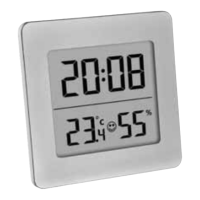
Digital Thermo-Hygrometer Device Overview

Device Elements and Components

Explains the display (A1-A6) and buttons (B1-B6) of the digital thermo-hygrometer.

Getting Started with the Device

Covers battery insertion, initial display check, and basic readiness for use.

Basic Device Operation

Details how to operate the device including setting the clock and alarm.

Digital Thermo-Hygrometer Settings and Features

Setting Clock and Calendar

Instructions for setting the time, date, and alarm time on the device.

Alarm and Hourly Chime Control

How to activate and deactivate alarm and hourly chime functions.

Displaying Date and Temperature Units

Guidance on viewing the date and switching between Celsius and Fahrenheit.

Maximum and Minimum Value Display

Instructions for viewing and clearing the recorded maximum and minimum values.

Digital Thermo-Hygrometer Maintenance and Disposal

Care and Maintenance

Recommendations for cleaning and maintaining the device's condition.

Battery Replacement Guide

Steps and advice for replacing the device's battery when needed.

Troubleshooting Common Issues

Solutions for common problems like no indication or incorrect readings.

Waste Disposal Instructions

Guidelines for environmentally friendly disposal of the device and batteries.
Summary

Digital Thermo-Hygrometer Device Overview

Device Elements and Components

Explains the display (A1-A6) and buttons (B1-B6) of the digital thermo-hygrometer.

Getting Started with the Device

Covers battery insertion, initial display check, and basic readiness for use.

Basic Device Operation

Details how to operate the device including setting the clock and alarm.

Digital Thermo-Hygrometer Settings and Features

Setting Clock and Calendar

Instructions for setting the time, date, and alarm time on the device.

Alarm and Hourly Chime Control

How to activate and deactivate alarm and hourly chime functions.

Displaying Date and Temperature Units

Guidance on viewing the date and switching between Celsius and Fahrenheit.

Maximum and Minimum Value Display

Instructions for viewing and clearing the recorded maximum and minimum values.

Digital Thermo-Hygrometer Maintenance and Disposal

Care and Maintenance

Recommendations for cleaning and maintaining the device's condition.

Battery Replacement Guide

Steps and advice for replacing the device's battery when needed.

Troubleshooting Common Issues

Solutions for common problems like no indication or incorrect readings.

Waste Disposal Instructions

Guidelines for environmentally friendly disposal of the device and batteries.

TFA 30.5038 Specifications

General IconGeneral
BrandTFA
Model30.5038
CategoryClock
LanguageEnglish

Related product manuals