1716
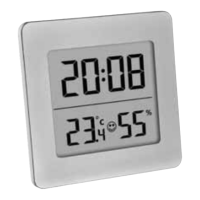
Digital thermo-hygrometer
7.1 Setting of the clock and calendar
• Press and hold the MODE button.
• The minute digits will be flashing.
• Press the UP button to set the minutes.
• Press the MODE button again and the setting sequence is shown as follows: Hours, 12-hour or
24-hour display format (AM or PM after 12 h appears on the display) month and day and adjust
it with the UP button.
• Confirm the setting with the MODE button.
• The display shows the current time.
7.2 Setting of the alarm time
• To enter the alarm mode, press the MODE button in normal mode.
• 0:00 (default) or the last adjusted alarm time appears on the display.
• Press and hold MODE button.
• The alarm symbol appears and the minute digits will be flashing.
• Press the UP button to set the minutes.
• Confirm the setting with the MODE button and set the hours in the same way.
• Confirm the setting with the MODE button.
• The display shows the adjusted alarm time and the alarm symbol. The alarm is activated.
• Press the MODE button again to return to the current time.
• When the adjusted alarm time is reached, the alarm will ring.
• Press any button to stop the alarm.
• If the alarm is not stopped manually, the increasing alarm will automatically turn off after cer-
tain minutes and will be reactivated at the same time.
• The alarm symbol stays in the display.
Digital thermo-hygrometer
•
When the alarm rings, press the SNOOZE button and the snooze function will be activated.
• The alarm will be interrupted for 8 minutes.
7.3 Activate and deactivate the alarm time and the hourly chime
• To enter the alarm mode, press the MODE button in normal mode.
• The adjusted alarm time appears on the display.
• Press the UP button once to activate the alarm. On the display appears the alarm symbol .
• Press the UP button twice to activate the hourly chime. On the display appears the symbol for
the hourly chime .
• Press the UP button three times to activate the alarm and the hourly chime. On the display
appear both symbols and .
• Press the UP button four times to deactivate both alarms. Both symbols disappear.
• Press the MODE button to return to normal mode.
7.4 Display of date
• Press the UP button in normal mode to show the date.
7.5 Temperature display
• Press the °C/°F button to change between °C (Celsius) or °F (Fahrenheit) as temperature unit.
7.5 Maximum and minimum values
• Press the MEM button.
• MAX appears on the display.
• The highest indoor temperature and humidity are displayed since the last reset.
• Press the MEM button again.
TFA_No. 30.5038_Anleit_04_23 20.04.2023 10:33 Uhr Seite 9


 To Next Page