EasyManua.ls Logo

TFA 60.1511 - User Manual

TFA 60.1511
30 pages
Go to English
Print Icon
To Next Page IconTo Next Page
Loading...
Bedienungsanleitung
Instruction manual
Mode d’emploi
Istruzioni per l'uso
Gebruiksaanwijzing
Instrucciones de uso
Kat. Nr. 60.1511
Instruction manuals
www.tfa-dostmann.de/en/service/downloads/instruction-manuals
Instruction manuals
www.tfa-dostmann.de/en/service/downloads/instruction-manuals
TFA_No. 60.1511_Anleitung_04_23 06.04.2023 13:42 Uhr Seite 1
Question and Answer IconNeed help?

Do you have a question about the TFA 60.1511 and is the answer not in the manual?

Summary

Before Using the Product

Delivery Contents

Product Features and Benefits

Safety Precautions

Risk of Injury

Critical safety warnings about potential harm from the device and its components.

Product Safety Information

Important guidelines to prevent damage and ensure safe operation of the product.

Product Elements and Display

Display Elements

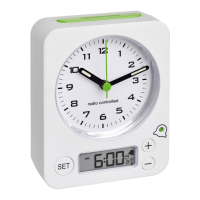
Explanation of display indicators like time, alarm, and battery symbols.

Device Buttons

Identification and function of the various buttons on the clock.

Device Housing

Identification of the battery compartment within the clock's housing.

Getting Started and DCF Reception

Initial Setup

Instructions for inserting batteries and initial device readiness checks.

DCF Signal Reception

Explanation of how the clock receives the radio-controlled time signal.

Operation and Settings

General Operation Notes

Key points regarding button operations and automatic setting mode exit.

Manual Time Settings

Procedure for manual time zone correction and clock time setting.

Alarm Time Setup

Steps to set the alarm time and activate the alarm function.

Backlight Function

How to activate and use the clock's backlight feature.

Maintenance and Troubleshooting

Care and Maintenance

Guidelines for cleaning and maintaining the instrument.

Battery Replacement

Instructions for changing batteries when the battery symbol appears.

Troubleshooting Common Issues

Solutions for problems like no indication or no DCF reception.

Disposal and Specifications

Waste Disposal Instructions

Proper procedures for disposing of the electrical device and batteries.

Technical Specifications

Details on the product's power consumption and battery requirements.
Summary

Before Using the Product

Delivery Contents

Product Features and Benefits

Safety Precautions

Risk of Injury

Critical safety warnings about potential harm from the device and its components.

Product Safety Information

Important guidelines to prevent damage and ensure safe operation of the product.

Product Elements and Display

Display Elements

Explanation of display indicators like time, alarm, and battery symbols.

Device Buttons

Identification and function of the various buttons on the clock.

Device Housing

Identification of the battery compartment within the clock's housing.

Getting Started and DCF Reception

Initial Setup

Instructions for inserting batteries and initial device readiness checks.

DCF Signal Reception

Explanation of how the clock receives the radio-controlled time signal.

Operation and Settings

General Operation Notes

Key points regarding button operations and automatic setting mode exit.

Manual Time Settings

Procedure for manual time zone correction and clock time setting.

Alarm Time Setup

Steps to set the alarm time and activate the alarm function.

Backlight Function

How to activate and use the clock's backlight feature.

Maintenance and Troubleshooting

Care and Maintenance

Guidelines for cleaning and maintaining the instrument.

Battery Replacement

Instructions for changing batteries when the battery symbol appears.

Troubleshooting Common Issues

Solutions for problems like no indication or no DCF reception.

Disposal and Specifications

Waste Disposal Instructions

Proper procedures for disposing of the electrical device and batteries.

Technical Specifications

Details on the product's power consumption and battery requirements.

TFA 60.1511 Specifications

General IconGeneral
BrandTFA
Model60.1511
CategoryClock
LanguageEnglish

Related product manuals