2524
Radio-controlled alarm clock
Radio-controlled alarm clock
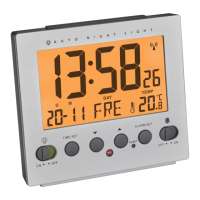
7.1.3 Setting of the day-of-week language
• In the setting mode you can set the day-of-the week language: Ger-
man (GER), English (EN), Dutch (NET), French (FRE), Italian (ITA),
Spanish (SPA), Danish (DAN) and Russian (RUS).
7.2 12-12-HR or 24-HR system
• Press the + button in normal mode to choose 12 HR or 24 HR sys-
tem. In the 12 HR system AM (before 12 o'clock) or PM (after 12
o'clock) appears on the display.
7.3 Setting of the alarm times
• Press the ALARM SET button in normal mode, to enter the alarm
mode.
• 7:00 (default) or the last adjusted alarm time flashes in the ALARM-1
display.
• Press the – or + button to set the desired alarm time.
• Confirm the setting with the ALARM SET button.
• Alarm times 2, 3 and 4 can be adjusted in the same way.
7.3.1 Activate and deactivate the alarm times
• Move the ALARM 1-4 switch upwards (ON) to activate the alarm
function.
• The device will automatically quit the setting mode if no button is
pressed for 15 seconds.
7.1 Manual setting of the clock and calendar
• Press and hold the TIME SET button for three seconds.
• 0 will be flashing.
• Press the – or + button to make the time zone correction.
• Press the TIME SET button to make the settings in the following
sequence: Hours, minutes, seconds, year, month, day, temperature
unit (default: °C) and day-of-week language (default: GER). Press –
or + to adjust the settings.
• The manually set time is overwritten once the DCF time signal is suc-
cessfully received.
7.1.1 Time zone setting
• In the setting mode you can make the time zone correction
(-12/+12).
• The time zone correction is needed for countries where the DCF sig-
nal can be received but the time zone is different from the DCF time
(e.g. +1=one hour plus).
7.1.2 Temperature unit setting
• In the setting mode you can change between °C (Celsius) or °F
(Fahrenheit) as temperature unit.
TFA_No. 60.2536_Anleit_03_21 06.03.2021 18:29 Uhr Seite 13



 To Next Page