Need help?
Do you have a question about the TFA 60.2540 and is the answer not in the manual?
Read the instruction manual carefully to learn functions, prevent damage, and heed safety advice.
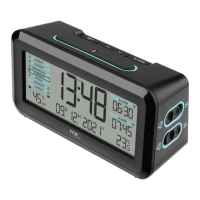
Lists the items included with the radio-controlled alarm clock, such as the clock and manual.
Highlights key features like radio-controlled time, date, weekday, and 25 different alarm sounds.
Covers intended use, unauthorized repairs, and hazards of battery ingestion or improper disposal.
Details the display elements (A) and device buttons (B) for user interaction and control.
Instructions for inserting batteries or connecting via micro-USB to power on the device.
Explains how the clock automatically receives the DCF time signal and its reception states.
Guides users through manual time/date setting, alarm configuration, and activation/deactivation.
Details how to select alarm melodies and adjust the alarm volume to different levels.
Instructions for changing temperature units (°C/°F) and managing the device's backlight.
Provides guidance on cleaning, battery replacement, and general care for the device.
Lists common problems like 'No display' or 'No DCF reception' and provides solutions.
Covers environmentally-friendly disposal of batteries/device and lists product technical specifications.
 General
| Display | LCD |
|---|---|
| Alarm Function | Yes |
| Snooze Function | Yes |
| Power Source | Battery |
| Type | Radio Controlled Alarm Clock |


 To Next Page