– 24 – – 25 –
2524
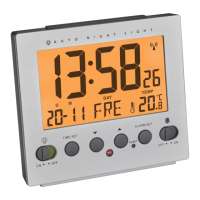
MELODY – Radio-controlled alarm clock with various alarm sounds
7. Operation
7.1 Manual settings
• Press and hold the respective button in the setting mode for fast mode.
• After setting slide the SET-MODE switch to the position LOCK.
7.1.1 Setting of the time and date
• Slide the SET-MODE switch to the position TIME. The time digits will be flashing.
• By default, the DCF reception is activated (ON). Press the 1/2/3 Year button for 3 seconds if you want to deactivate the
DCF reception (OFF). Once the DCF time reception is deactivated the clock must be manually set.
• Press the HOUR DAY/ button to adjust the hours and the MIN/°C/°F Month button to adjust the minutes.
• Slide the SET-MODE switch to the position DATE. The year digits appear and the date flashes.
• Press the MIN/°C/°F Month button to adjust the month and the HOUR DAY/ button to adjust the day. Press the 1/2/3
Year button to adjust the year.
• Note: Once the DCF time signal is successfully received and the DCF reception is activated (ON), the manually set time is
overwritten.
MELODY – Radio-controlled alarm clock with various alarm sounds
7.2 Alarm time setting
• Slide the SET-MODE switch to ALARM. 1 and 7:00 (default) or the last adjusted alarm time appear on the display.
• Choose with the 1/2/3 Year button the alarm time 1, 2 or 3.
• Press the HOUR DAY/ button to adjust the hours and the MIN/°C/°F Month button to adjust the minutes.
7.3 Alarm setting
• The MODE switch at the back allows you to choose between three different alarm functions (MO-SU, MO-FR, SA-SU).
7.4 Activate and deactivate the alarm time
• Choose with the 1/2/3 Year button the alarm time 1, 2 or 3.
• 1, 2 or 3 appears on the display.
• To activate/deactivate the alarm function, move the ON/OFF switch to ON or OFF.
• The alarm symbol appears/disappears on the display.
• When the adjusted alarm time is reached, the alarm rings.
• You can stop the alarm as follows:
• Press and hold the LIGHT/SNOOZE sensor button for 3 seconds.
• Press the 1/2/3 Year, MIN/°C/°F Month or HOUR DAY/ button.
• If the alarm is not stopped manually, the alarm tone automatically turns off after one minute and will be reactivated at the
same set time in the following day.
TFA_No. 60.2540_anl_01_18 06.01.2018 10:27 Uhr Seite 13



 To Next Page