2120
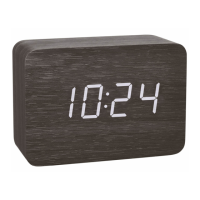
CLOCCO – Wood style radio-controlled alarm clock with large LED digits
CLOCCO – Wood style radio-controlled alarm clock with large LED digits
• Radio-controlled clock with highest precision and manual setting option
• Display of time, date or indoor temperature, automatic change is adjustable
• Alarm clock function
• Touch or clap-activated display, continuous operation by power adapter only
4. For your safety
• This product is exclusively intended for the range of application described above. It should only be used as described within these instructions.
• Unauthorized repairs, alterations or changes to the product are prohibited.
Caution!
Risk of electrocution!
• Plug the device only into a mains socket installed within your country’s electrical safety regulations and with a correct mains voltage (see nameplate).
• The mains socket must be located near the equipment and it must be easily accessible.
• Unplug the device immediately if any fault occurs.
Thank you for choosing this instrument from TFA.
1. Before you use this product
• Please make sure you read the instruction manual carefully.
• Following and respecting the instructions in your manual will prevent damage to your instrument and loss of your statutory rights arising from
defects due to incorrect use.
• We shall not be liable for any damage occurring as a result of non following of these instructions.
• Please take particular note of the safety advice!
• Please keep this instruction manual safe for future reference.
2. Delivery contents
• Radio-controlled alarm clock • Instruction manual
• Power adapter
3. Range of application and all the benefits of your new instrument at a glance
• Minimalist wood-style with invisible display
• LED digits with 3 brightness levels and automatic dimming function
TFA_No. 60.2549_Anleitung_07_20 08.07.2020 9:45 Uhr Seite 11


 To Next Page