EasyManua.ls Logo

TFA KLIMA GUARD - User Manual

TFA KLIMA GUARD
22 pages
Go to English
Print Icon
To Next Page IconTo Next Page
Loading...
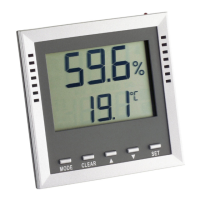
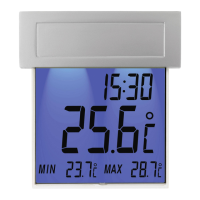
KLIMA GUARD – Termo-Higrómetro digital
44
La denominación de los metales pesados que contiene es:
Cd=cadmio, Hg=mercurio, Pb=plomo.
Este dispositivo está identificado conforme a la Directiva de la
UE sobre residuos de aparatos eléctricos y electrónicos (WEEE).
No deseche este producto junto con la basura doméstica. El
usuario está obligado a llevar el dispositivo usado a un punto de
recogida de aparatos eléctricos y electrónicos acreditado para
que sea eliminado de manera respetuosa con el medio ambiente.
Datos técnicos
Gama de medición temperatura: -40 °C...+70 °C (-40 °F...+158 °F)
Precisión: ±0,5°C @ 0…50°C, si no ±1 °C
Humedad del aire: 1% … 99%
Precisión: ±3% de 35% hasta 75%, si no ±5%
Alimentación de tensión: Pilas 2 x 1,5 V AAA
Dimensiones del cuerpo: 106 x 24 (44) x 106 mm
Peso: 107 g (solo dispositivo)
TFA Dostmann GmbH & Co. KG, Zum Ottersberg 12, D-97877 Wertheim, Alemania
Estas instrucciones o extractos de las mismas no pueden ser publicados sin la autoriza-
ción de la TFA Dostmann. Los datos técnicos de este producto corresponden al estado
en el momento de la impresión y pueden ser modificados sin previo aviso. Los actuales
datos técnicos e informaciones sobre su producto los puede encontrar bajo el número de
artículo en nuestra página web.
www.tfa-dostmann.de 09/19
Kat. Nr. 30.5010
Bedienungsanleitung
Operating Instructions
Instrucciones para el manejo
Gebruiksaanwijzing
Mode d’emploi
Istruzioni
TFA No. 30.5010 Anleit_09_19 13.09.2019 11:46 Uhr Seite 1

Other manuals for TFA KLIMA GUARD

Question and Answer IconNeed help?

Do you have a question about the TFA KLIMA GUARD and is the answer not in the manual?

Summary

KLIMA GUARD Digital Thermo-Hygrometer

Introduction and Manual Languages

Lists the purpose of the manual in multiple languages.

Technical Specifications

Details temperature/humidity ranges, precision, power, dimensions, and weight.

Environmental Compliance and Disposal

Covers WEEE directive, heavy metal content, and proper disposal methods.

Before Using the Thermo-Hygrometer

Preparation and Initial Use

Guidelines for reading the manual, first use, and liability.

Delivery Contents and Instrument Benefits

Lists included items and highlights key measuring capabilities.

Safety Precautions and Warnings

Covers intended use, hazards, and safe handling practices.

Understanding Temperature and Humidity

Air Moisture Interaction

Explains how temperature affects air's moisture absorption capacity.

Dew Point Explanation

Defines dew point and its relation to temperature and humidity.

Operating the Digital Thermo-Hygrometer

Display Information

Details how temperature and humidity are shown on the display.

MAX;MIN Value Functions

Instructions for viewing and resetting maximum and minimum measurements.

Dew Point and Wet-Bulb Temperature Display

How to switch between different measurement displays.

Auto Shut Down Feature

How to activate, deactivate, and use the automatic display shut-off.

Setting Alarms

Guides on configuring low and high alarm limits for temperature and humidity.

Advanced Operations and Maintenance

Alarm Functionality

Details how alarms are triggered and how to stop them.

Positioning and Fixing

Recommendations for placing the unit for optimal monitoring.

Care and Maintenance

Instructions for cleaning, battery removal, and storage.

Battery Replacement

Steps for opening the compartment and replacing batteries.

Troubleshooting Common Issues

Solutions for problems like 'No display' or 'Incorrect display'.

Summary

KLIMA GUARD Digital Thermo-Hygrometer

Introduction and Manual Languages

Lists the purpose of the manual in multiple languages.

Technical Specifications

Details temperature/humidity ranges, precision, power, dimensions, and weight.

Environmental Compliance and Disposal

Covers WEEE directive, heavy metal content, and proper disposal methods.

Before Using the Thermo-Hygrometer

Preparation and Initial Use

Guidelines for reading the manual, first use, and liability.

Delivery Contents and Instrument Benefits

Lists included items and highlights key measuring capabilities.

Safety Precautions and Warnings

Covers intended use, hazards, and safe handling practices.

Understanding Temperature and Humidity

Air Moisture Interaction

Explains how temperature affects air's moisture absorption capacity.

Dew Point Explanation

Defines dew point and its relation to temperature and humidity.

Operating the Digital Thermo-Hygrometer

Display Information

Details how temperature and humidity are shown on the display.

MAX;MIN Value Functions

Instructions for viewing and resetting maximum and minimum measurements.

Dew Point and Wet-Bulb Temperature Display

How to switch between different measurement displays.

Auto Shut Down Feature

How to activate, deactivate, and use the automatic display shut-off.

Setting Alarms

Guides on configuring low and high alarm limits for temperature and humidity.

Advanced Operations and Maintenance

Alarm Functionality

Details how alarms are triggered and how to stop them.

Positioning and Fixing

Recommendations for placing the unit for optimal monitoring.

Care and Maintenance

Instructions for cleaning, battery removal, and storage.

Battery Replacement

Steps for opening the compartment and replacing batteries.

Troubleshooting Common Issues

Solutions for problems like 'No display' or 'Incorrect display'.

TFA KLIMA GUARD Specifications

General IconGeneral
TypeWireless digital thermometer
Measuring Range Humidity10...99%
Transmission range100 m
Power supply stationBatteries
Power supply sensorBatteries
AccuracyTemperature: ±1°C, Humidity: ±5%
ResolutionTemperature: 0.1°C, Humidity: 1%
Power supplyBattery

Related product manuals