3.Press ▲ or ▼ button to decrease or increase the
temperature setting.
4.Hold ▲ or ▼ button to fast advances the adjustment
rate.
5.Press R button to terminate the
setting procedure and back to
normal mode with the new
temperature setting.
6.The unit will be back to normal
operation mode automatically
when no button is pressed about
10 seconds.
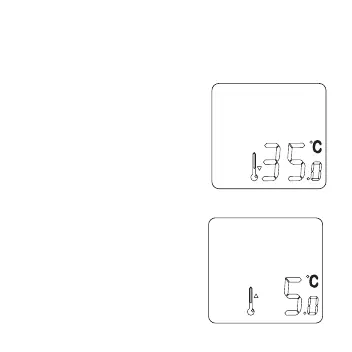
7. Program temperature can only be set in the control
temperature range from 5˚C to
35˚C, not wrap around at two
ends. When pressing the ▲
button to increase the
temperature to 35˚C, the “up
arrow” of the Manual Override
Icon will be turned off as shown.
16


 To Next Page