EasyManua.ls Logo

TFT Typhoon - User Manual

TFT Typhoon
36 pages
Print Icon
To Next Page IconTo Next Page
Loading...
©Copyright Task Force Tips LLC 2004-2018 LIY-050 January 23, 2018 Rev13
MANUAL: TYPHOON
& TYPHOON RC MONITOR
See Remote Control (RC) Monitor Electrical Controls Supple-
mental Instructions For Use With Typhoon RC Models
INSTRUCTIONS FOR INSTALLATION, SAFE OPERATION AND MAINTENANCE
DANGER
Understand manual before use. Operation of this device without understanding the manual and
receiving proper training is a misuse of this equipment. Obtain safety information at www.tft.
com/serial-number
TASK FORCE TIPS LLC
MADE IN USA • tft.com
3701 Innovation Way, Valparaiso, IN 46383-9327 USA
800-348-2686 • 219-462-6161 • Fax 219-464-7155
Typhoon Tiller Typhoon Tiller
With Handwheel Elevation
Typhoon
Dual Handwheel
See Section 3.1 for Flow/Pressure
Operations Envelope
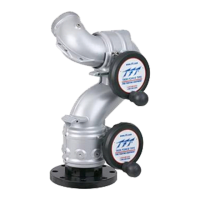
typhoon
typhoon rc
Typhoon RC

Questions and Answers

TFT Typhoon Specifications

General IconGeneral
Response Time25ms
Contrast Ratio300:1
Viewing AngleH: 120°, V: 90°
InputVGA
Input ConnectorsVGA
Power Consumption30W

Summary

Safety Signal Word Definitions

Safety Precautions

General Product Information

Mechanical Specifications

Details technical specifications including weight, dimensions, materials, and torque limits.

Part Identification and Models

Identifies different Typhoon monitor models and their key components.

Inlets and Outlets

Lists available inlet options (flanges, NPT, BSP) and outlet options.

Overall Dimensions

Provides detailed dimension diagrams for various Typhoon monitor configurations.

Installation Procedures

Structural Mounting Requirements

Specifies structural integrity needs and flange bolt tightening for safe monitor mounting.

Inlet Mounting and Travel Ranges

Details inlet fitting, extend-a-gun installation, and horizontal/elevation travel stop adjustments.

Nozzle Installation

Instructions for securely attaching nozzles, ensuring clearance and proper thread matching.

Pressure Gage Port Installation

Instructions for installing a pressure gauge into the designated port.

Handle Installation

Guidance on installing the tiller handle, including use of Loctite.

Drainage and Maintenance

Information regarding drainage and maintenance for corrosion prevention.

Ladder Monitor Installation

Covers specific mounting considerations for ladder trucks, including anti-back-drive gearbox.

Monitor Operation

Horizontal Rotation Control

Explains how to use the handwheel for horizontal nozzle movement and locking.

Elevation Control

Details operation of the handwheel for vertical nozzle adjustment and range.

Tiller Bar Model Operation

Describes horizontal rotation control via the tiller handle and locking mechanism.

Recommended Park Position

Guidance on parking the monitor for safe transport and to minimize backlash.

Manual Override Knobs

Information on using manual override knobs for operation during electrical system failure.

Flows and Pressures

Stacked Tips Flow and Reach

Presents data and graphs on flow rates, reaction forces, and stream trajectories for stacked tips.

MST-4 NJ Flow and Reach

Provides flow and reach data for specific MST-4NJ nozzle sizes at various pressures.

Automatic Masterstream Nozzles

Information on automatic nozzles and their integration with the monitor's operating envelope.

Monitor Friction Loss

Graph illustrating friction loss within the Typhoon monitor at different flow rates.

Stream Straighteners

Discusses the use and impact of stream straighteners with stacked tips and fog nozzles.

FM Approval Information

Drawings and Parts Lists

Manual Typhoon Drawing

Exploded view and parts list for the manual Typhoon monitor.

Typhoon RC Drawing

Exploded view and parts list for the electric remote controlled Typhoon RC monitor.

Ladder Typhoon RC Drawing

Exploded view and parts list for the Ladder Typhoon RC monitor.

Control Box Subassembly

Details the components and parts for the control box subassembly.

Motor Enclosure Subassembly

Lists parts and diagrams for the motor enclosure subassembly.

Product Warranty

Maintenance and Troubleshooting

General Maintenance

General guidance on keeping the monitor clean and in good working order.

Lubrication

Instructions on applying grease to worm gears for smooth operation.

Troubleshooting Guide

Lists common symptoms, their possible causes, and recommended remedies.

Customer Support

Provides contact information for customer support and questions.

Inspection Checklist

Checklists for inspecting the monitor before each use and before returning to service.

Related product manuals