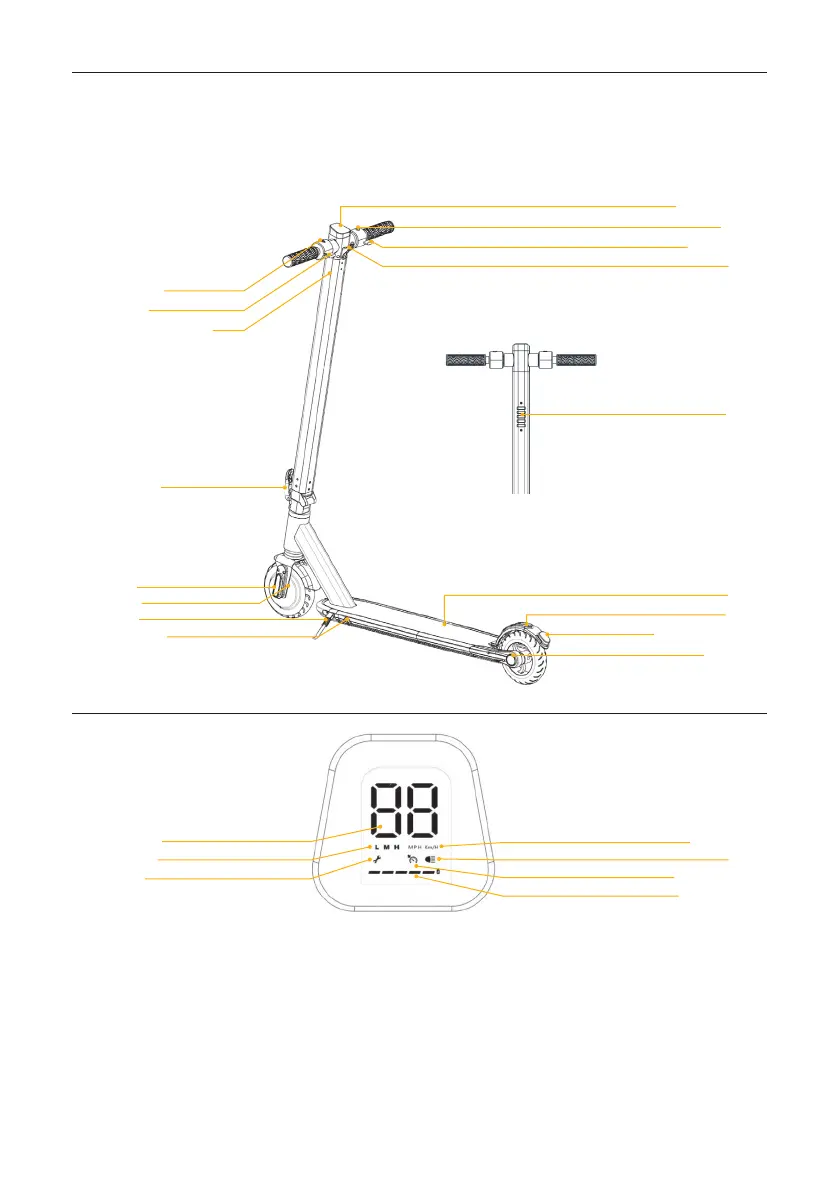
2. Product overview
Control panel
Using the control panel
1. Power on / off
Press the button on the right side to turn it on. Long press to turn it off.
2. Run switch
The system has three gears: L (low speed), M (medium speed) and H (maximum speed). Press the button
on the left side to change gear.
3. Lights
When the scooter is turned on, press the button on the destroy side to turn the light on and off.
4. Configuration of the speed unit
The scooter is set to KM / H by default
5. Automatic speed adjustment
Automatic activation when accelerating for 5 seconds without interruption. This mode will be deactivated as
soon as the brake lever is pressed.
Switch Button
Brake lever
Battery compartment
Folding lever
Reflector
Motor hub
Kickstand
Charging port
Speedometer
Switch mode
Motor error
Deck
Brake
Brake light (stop)
Reflector
Speed unit
Light
Cruise control
Level battery
Control Panel
Power
Accelerator
Hook
Light


 To Next Page