— E19 —
Operation
Playing Songs from the Recorded Files
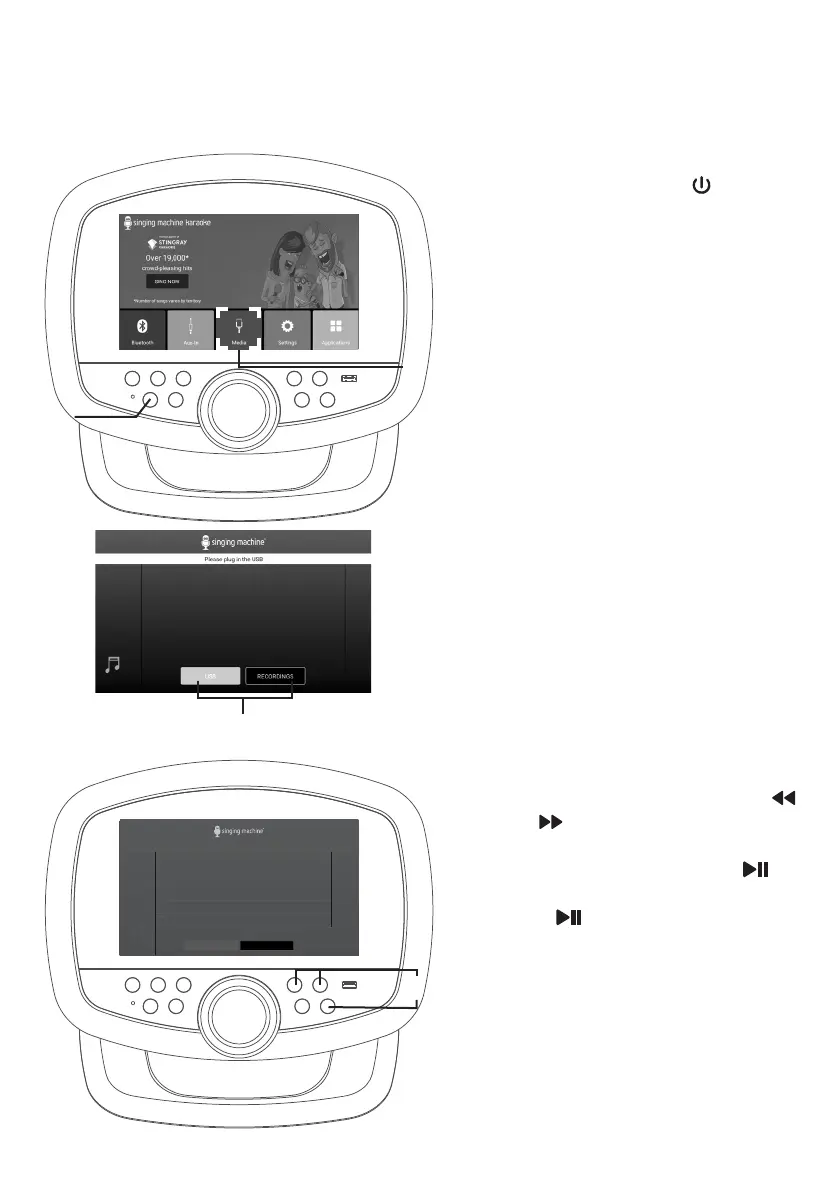
1
Connect the unit as described
previously. Press the button to
turn the unit on.
2
Select MEDIA to enter.
3
Press USB or RECORDINGS to
choose your desired playlist.
NOTE: If the audio file to be played is
recorded on a USB flash drive, please insert
the USB flash drive into the USB port of
this unit.
4
Use the touch screen or the
or
button to select a recorded
audio file from the song list. Press
once on touch screen or to
start playing the audio file. Press
the button on the control
panel during playback to pause the
file.
NOTE: To delete a file, press and hold the
file on the touch screen.
w
x
YOUR MUSIC
RECORDINGSUSB
RECORDINGS
3 Doors down - The Better Life
In the style of 3 Doors Down
3 Doors down - The Better Life
In the style of 3 Doors Down
3 Doors down - The Better Life
In the style of 3 Doors Down
3 Doors down - The Better Life
In the style of 3 Doors Down
3 Doors down - The Better Life
In the style of 3 Doors Down
u
v


 To Next Page