— E5 —
Connections
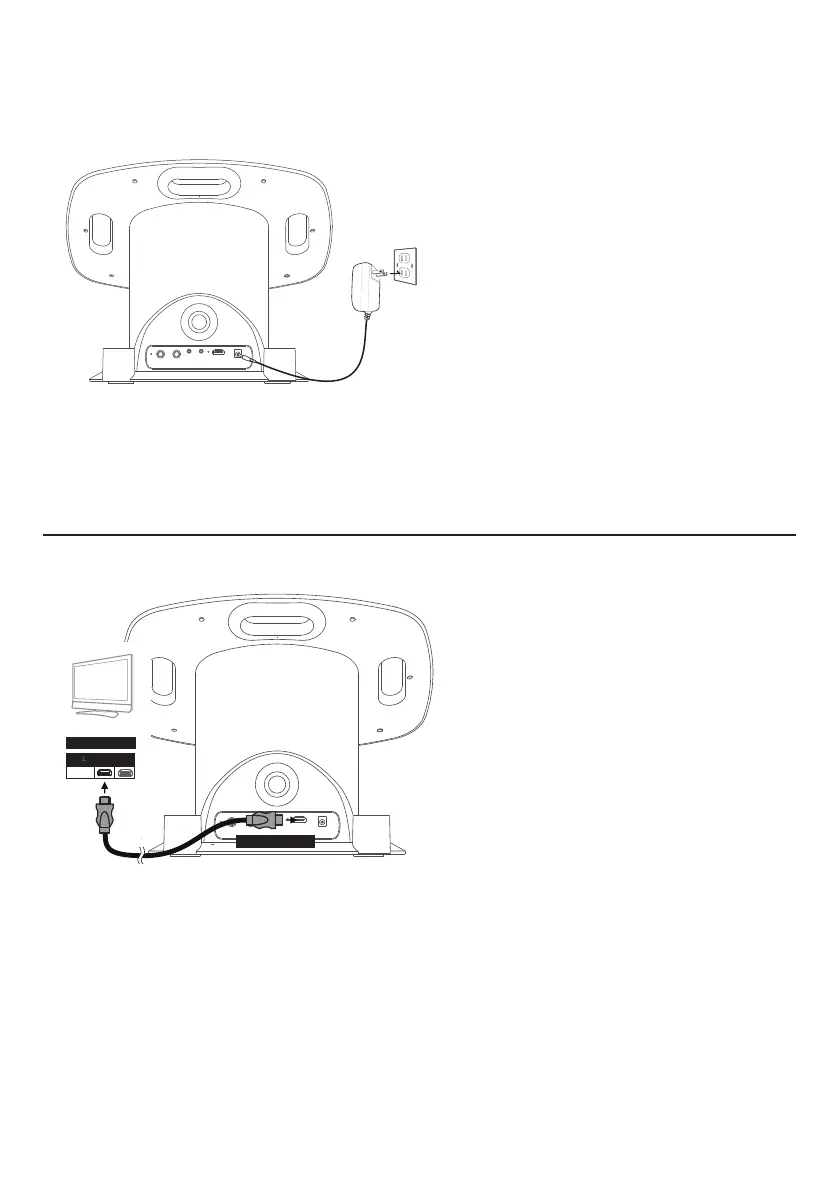
1
Insert the DC plug of the adapter
into the DC IN Jack located on the
main unit.
2
Insert the AC adapter into a
conveniently located AC outlet
having 120V AC, 60Hz.
3
Secure the power cord into the
pre-installed Power Cord Clamps.
Connecting to AC Power
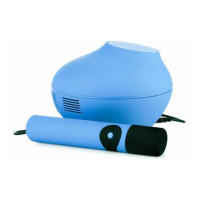
Connecting the Unit to a TV
HDMI Cable
HDMI Jack (Out)
Rear of External TV
HDMI Jack (In)
HDMI IN 1
The video and lyrics will be displayed on
the built-in screen. You may also want
to connect a TV to display a larger image
(follow the steps below):
Plug the HDMI cable (not included) into
the HDMI Jack on the back of the unit.
Plug the other end of the HDMI cable into
the HDMI input on your TV.
NOTES:
• This unit can be used with or without a TV.
• Also refer to the TV’s or external unit’s User Guide.
• Audio and mic input cannot be output to your TV.
NOTE:
• Make all connections prior to plugging the AC adaptor into a power outlet.
• The AC adaptor has a polarized plug that fits into the AC outlet only one way. If the plug
does not fit properly, turn it over and try again. Do not force and do not file or cut the wide
blade.


 To Next Page