— E7 —
Operation
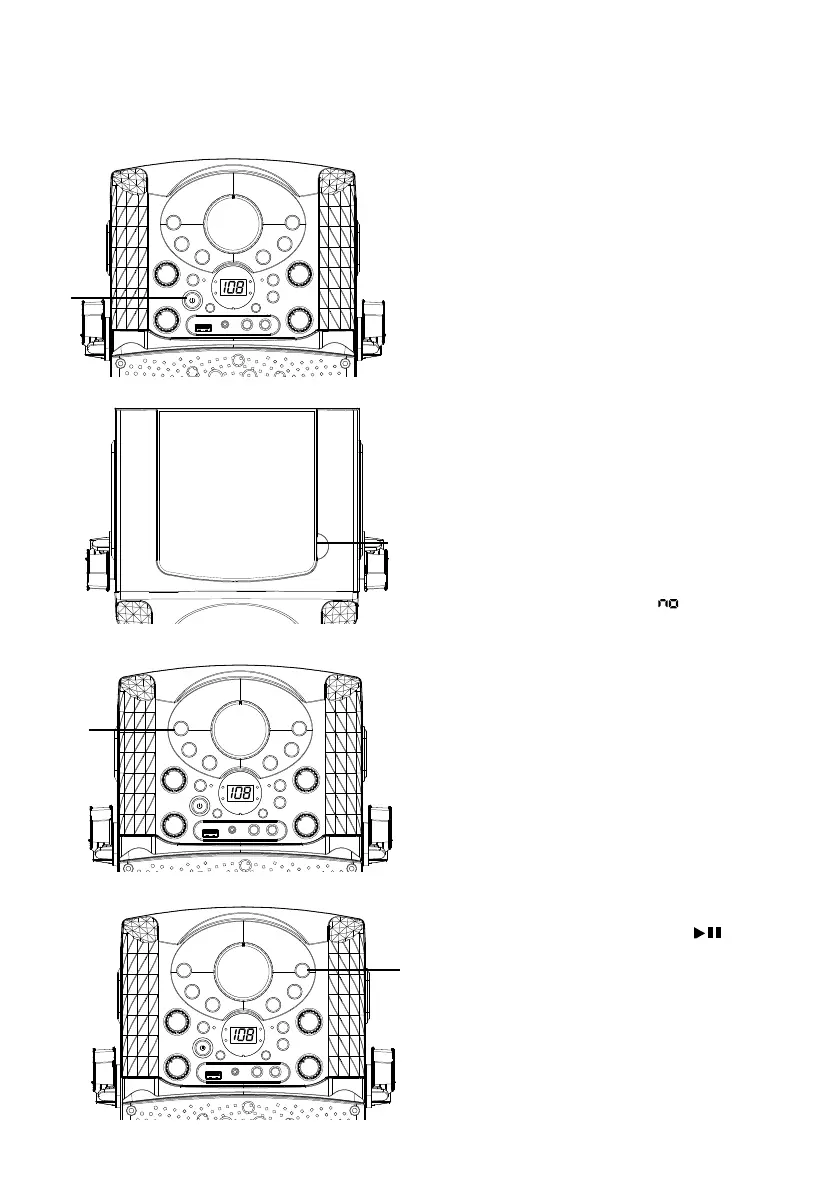
Playing a CDG
1
Connect the unit as described
previously; if using a CD+G, it is
recommended to connect to a TV
(see page E5). Press the power ON/
OFF button to turn the unit on.
2
Lift open the CD door and insert a
CD or a CD+G by gently pressing it
on the center spindle. Then close the
CD door.
Note:
• What is a CD+G?
A CD+G (CD+Graphics) is the
standard format for most karaoke
discs that will display the words on
the screen.
• Never place anything other than a
CD in the compartment, as foreign
objects can damage the unit.
• If no disc is inserted, “ ” will appear
on the display.
• If connected to a TV and/or other
audio source, adjust the volume of
the external unit using its own volume
control.
3
Repeatedly press the CDG/USB/
BT button to select the CDG mode;
“---” will appear when searching the
disc and then the total number of
tracks will appear. When a CDG disc
is inserted, the CDG indicator will
light.
4
Press the PLAY/PAUSE button
to start playback; if listening to
a CD+G file, the image and lyrics
will appear on the TV screen (if
connected) and the PLAY/PAUSE
Indicator will light.
u
v
w
x














 To Next Page