EasyManua.ls Logo

Theben compact office - User Manual

Theben compact office
4 pages
Print Icon
To Next Page IconTo Next Page
Loading...
Theben AG
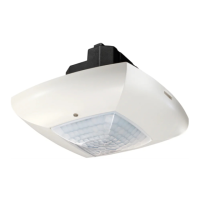
Presence detector compact office
Mixed light measurement
Presence detection
Artificial light
Push button/switch for manual
lighting control
HVAC/surveillance
Incident daylight
compact office
compact office Product Features
Passive infrared presence detector for ceiling mounting
Square 360° detection range
Automatic HVAC and lighting control
as well as room surveillance
Mixed light measurement
Switched output for light (relay, 230V)
Lighting control with brightness threshold value
and self-learning switch off delay time
Fully or semi-automatic operation switch-selectable
Push button or switch connection for manual control
Push button function: room/corridor
Pulse function for staircase lighting timer
Switched output for presence (potential-free relay)
HVAC control with switch on delay and
switch off delay time
reduced response characteristic for room surveillance
Service remote control QuickSet plus (optional)
User remote control clic (optional)
Switched Output for Light
The switching behavior is controlled by presence and
brightness. The contact closes in case of darkness and pres-
ence, and opens in case of brightness or absence
(see “Fully or Semi-automatic Operation” below).
The minimum switch off delay time (10s - 20min) and the
desired brightness switching threshold (10 - 1500Lux) are
adjustable. The switch off delay time automatically adapts
to the occupant’s behavior (self-learning characteristic),
i.e. the unit is able to automatically extend the switch off
delay time to max. 15min or reduce it to the minimum set
time. The switch off delay time will not be changed if it is
set to 2 min. or less.
Fully or Semi-automatic Operation
The compact office optionally allows fully automatic
lighting control for more convenience, or semi-automatic
control for better energy-saving results.
In the “fully automatic” operation mode, the lighting is
switched on and off automatically depending on the pres-
ence and brightness in the room.
In the “semi-automatic” operation mode, the light must
always be switched on manually. Switching off however, is
done automatically. In both operation modes, the light can
always be switched manually by means of push buttons (or
switches). Multiple push buttons can be connected to one
control input (illuminated push buttons may only be used
with neutral conductor connection).
Switching Behavior in Fully Automatic Mode
If the lighting is switched on manually, it remains on for
at least 30min if persons are present and is automati-cally
switched off afterwards if the brightness is sufficient. If the
room is vacated (earlier) the light is definitely switched off
after the set switch off delay time. The lighting can always
be switched off manually. The light remains off as long as
persons are present in the room. If the room is vacant for
a longer period (switch off delay time elapsed) the manual
off status is deactivated, and the lighting returns to auto-
matic switching.
Lighting
Push button/
switch
HVAC/surveillance
SYSTEMS FOR TIME, LIGHT, CLIMATE
Question and Answer IconNeed help?

Do you have a question about the Theben compact office and is the answer not in the manual?

Summary

Switched Output for Light

Fully or Semi-automatic Operation

Allows fully automatic or semi-automatic lighting control based on presence and brightness.

Switching Behavior in Fully Automatic Mode

Details how lighting switches on/off manually or automatically based on presence and sufficient brightness.

Schematic Wiring Diagrams and Parallel Connections

Single Unit Operation Wiring

Illustrates the wiring for a single presence detector unit.

Master-Slave Parallel Circuit Operation

Shows wiring for connecting multiple detectors in a master-slave configuration.

Master-Master Parallel Circuit Operation

Details wiring for connecting multiple masters for independent lighting control.

Detector Functions and Behavior

Switching Behavior in Semi-automatic Mode

Lighting must be switched on manually; switching off is automatic.

Push Button Functions

Configurable push button functions for 'Room' or 'Corridor' modes.

Pulse Function for Staircase Lighting

Generates a short pulse for staircase lighting timers.

Switched Output for Presence

Potential-free relay output for HVAC control, affected by presence only.

HVAC Control with Time Delays

Switch-on and switch-off delay for HVAC control and room surveillance.

Interconnection of Detectors

Details on connecting multiple detectors for extended coverage.

Detection Range and Brightness Settings

Detection Range Specifications

Defines detection ranges for seated and walking persons at different mounting heights.

Brightness Measurement

Explains mixed light measurement and brightness threshold adjustment.

Suitable Lamps

Lists lamp types compatible with the presence detector.

Technical Specifications and Accessories

Sensor Module and Settings

Details sensor module rear view and on-device settings.

Technical Specifications

Provides detailed electrical and performance specifications for the detector.

Accessories

Information on optional service remote controls and surface frames.

Declaration of CE Conformity

States compliance with relevant EU directives.

Summary

Switched Output for Light

Fully or Semi-automatic Operation

Allows fully automatic or semi-automatic lighting control based on presence and brightness.

Switching Behavior in Fully Automatic Mode

Details how lighting switches on/off manually or automatically based on presence and sufficient brightness.

Schematic Wiring Diagrams and Parallel Connections

Single Unit Operation Wiring

Illustrates the wiring for a single presence detector unit.

Master-Slave Parallel Circuit Operation

Shows wiring for connecting multiple detectors in a master-slave configuration.

Master-Master Parallel Circuit Operation

Details wiring for connecting multiple masters for independent lighting control.

Detector Functions and Behavior

Switching Behavior in Semi-automatic Mode

Lighting must be switched on manually; switching off is automatic.

Push Button Functions

Configurable push button functions for 'Room' or 'Corridor' modes.

Pulse Function for Staircase Lighting

Generates a short pulse for staircase lighting timers.

Switched Output for Presence

Potential-free relay output for HVAC control, affected by presence only.

HVAC Control with Time Delays

Switch-on and switch-off delay for HVAC control and room surveillance.

Interconnection of Detectors

Details on connecting multiple detectors for extended coverage.

Detection Range and Brightness Settings

Detection Range Specifications

Defines detection ranges for seated and walking persons at different mounting heights.

Brightness Measurement

Explains mixed light measurement and brightness threshold adjustment.

Suitable Lamps

Lists lamp types compatible with the presence detector.

Technical Specifications and Accessories

Sensor Module and Settings

Details sensor module rear view and on-device settings.

Technical Specifications

Provides detailed electrical and performance specifications for the detector.

Accessories

Information on optional service remote controls and surface frames.

Declaration of CE Conformity

States compliance with relevant EU directives.

Overview

The ThebenHTS compact office is a passive infrared presence detector designed for ceiling mounting, offering comprehensive control over lighting, HVAC, and room surveillance. It features a square 360° detection range and incorporates mixed light measurement for optimal performance.

Function Description:

The device provides a switched output for lighting (relay, 230V) with control based on brightness threshold and a self-learning switch-off delay time. Users can select between fully automatic or semi-automatic operation. Manual control is possible via a push button or switch connection, with options for "room" or "corridor" push button functions, and a pulse function for staircase lighting timers.

A second switched output, a potential-free relay, is dedicated to presence detection for HVAC control and room surveillance. This output includes a switch-on delay and switch-off delay time, with a reduced response characteristic for room surveillance.

Lighting Control:

  • Switching Behavior: Lighting is controlled by presence and brightness. The contact closes in darkness and presence, opening in brightness or absence.
  • Delay Times: The minimum switch-off delay time is adjustable from 10 seconds to 20 minutes. The desired brightness switching threshold can be set between 10 and 1500 Lux.
  • Self-Learning: The switch-off delay time automatically adapts to occupant behavior, extending up to 15 minutes or reducing to the minimum set time. This adaptation is inactive if the delay is set to 2 minutes or less.
  • Fully Automatic Mode: Lighting switches on and off automatically based on presence and brightness.
  • Semi-Automatic Mode: Lighting must be switched on manually, but switches off automatically.
  • Manual Override: In both modes, lighting can be manually switched on or off via push buttons or switches. Multiple push buttons can be connected to one control input.
  • Manual On Behavior (Fully Automatic Mode): If lighting is manually switched on, it remains on for at least 30 minutes if persons are present, then switches off automatically if brightness is sufficient. If the room is vacated earlier, the light switches off after the set delay time.
  • Manual Off Behavior (Fully Automatic Mode): If lighting is manually switched off, it remains off as long as persons are present. If the room is vacant for a longer period (switch-off delay time elapsed), the manual off status is deactivated, and automatic switching resumes.
  • "Room or Corridor" Push Button Function: DIP switches allow setting the push button function. In "Room" mode, lighting can be switched on and off manually. In "Corridor" mode, the detector acts as a staircase lighting timer, and the light cannot be switched off manually.
  • Pulse Function: For controlling existing staircase lighting timers, the switch-off delay time can be set to "Pulse." In this mode, the switched output for light generates a 0.5-second pulse every 10 seconds in case of presence and darkness.

HVAC Control and Room Surveillance:

  • Switched Output for Presence: This potential-free contact is used for HVAC control and room surveillance. Its behavior is solely affected by presence, not brightness. The contact closes with presence and opens with absence, and is not affected by push buttons.
  • Switch-on Time Delay: Adjustable from 0 seconds to 10 minutes, this delay prevents immediate system activation. The contact closes only after the delay has elapsed, provided presence is continuous. Once closed, the switch-off delay time (10 seconds - 120 minutes) restarts with each movement detection.
  • Room Surveillance: If the switch-on delay is set to "Surveillance," the sensitivity of the presence output is reduced. The contact closes only for distinct movements, reliably indicating presence. The switch-off delay time remains active, while the switch-on time delay is inactive.

Interconnection:

  • Single Unit Operation: The compact office detects presence and brightness, controlling lighting and HVAC/surveillance via its two contacts.
  • Parallel Connection (Master-Slave): For larger rooms, up to 10 detectors can be connected in parallel by interconnecting the P-terminals. One detector acts as the master, controlling brightness measurement, potentiometer adjustments, and all push button connections, and switching the entire load. Other detectors are slaves, providing only presence information.
  • Parallel Connection (Master-Master): Multiple masters can be connected in parallel, with each master controlling its own lighting row based on its individual brightness measurement, delay times, and brightness threshold. The switched load is split among masters, and presence is detected by all detectors. The presence output can be tapped from any master.

Important Technical Specifications:

  • Detection Range:
    • Horizontal: 360°
    • Vertical: 120°
    • Recommended Mounting Height: 2.0 - 3.0m
    • Maximum Range: 6x6m (H.mont. 2.5m), 8x8m (H.mont. 3.5m)
    • Seated Persons (at 3.0m height): 4.5m x 4.5m
    • Walking Persons (at 3.0m height): 7.0m x 7.0m ± 1.0m
  • Mixed Light Control:
    • Brightness Threshold: 10 - 1500 Lux
    • Deactivated: "on" setting
  • Switch-off Delay for Light: 10 sec - 20 min (or 0.5 sec "on"/10 sec "off" for pulse)
  • Switch-off Delay for Presence: 10 sec - 120 min
  • Switch-on Delay for Presence: 0 sec - 10 min
  • Mains Voltage: 230V ±10%, 50Hz
  • Relay Output A (Light):
    • Nominal Voltage: 230V ±10%
    • Max. Switching Capacity: 1400VA (incandescent/halogen: 1200W)
    • Max. Electronic Ballasts: 10x (1x58W), 5x (2x58W), 16x (1x36W), 8x (2x36W), 16x (<36W)
  • Relay Output B (Presence):
    • Max. Voltage: 220V DC / 250V AC
    • Max. Switching Capacity: 50W / 50VA
    • Recommended Min. Load: 0.5mV / 10mA
  • Ambient Temperature: 0°C - 50°C
  • Degree of Protection: IP 40

Usage Features:

  • Mixed Light Measurement: The detector is equipped with mixed light measurement. For indirect lighting, the brightness at the installation site should not exceed 2000 Lux (for brightness thresholds > 200 Lux). Setting the brightness threshold to "On" deactivates measurement.
  • Suitable Lamps: Designed for fluorescent lights (FL/PL) and halogen/incandescent lights.
  • Electronic Ballast Control: The maximum number of electronic ballasts is limited by high inrush currents. External protection may be needed for high loads.
  • Interference Suppression: All switched loads must be provided with adequate interference suppression.

Maintenance Features:

  • Remote Control QuickSet plus (Optional): For convenient remote adjustment of all potentiometer values during start-up or service.
  • Remote Control clic (Optional): For user-friendly individual switching of up to two lighting groups and selection between two programmable scenes.
  • DIP Switches: For configuring lighting control (fully/semi-automatic), push button function (room/corridor), push button/switch control, and operation mode (normal/test).
  • Mechanical Safety Lock: Secures the sensor module firmly on the power module.

Theben compact office Specifications

General IconGeneral
BrandTheben
Modelcompact office
CategorySecurity Sensors
LanguageEnglish

Related product manuals