5
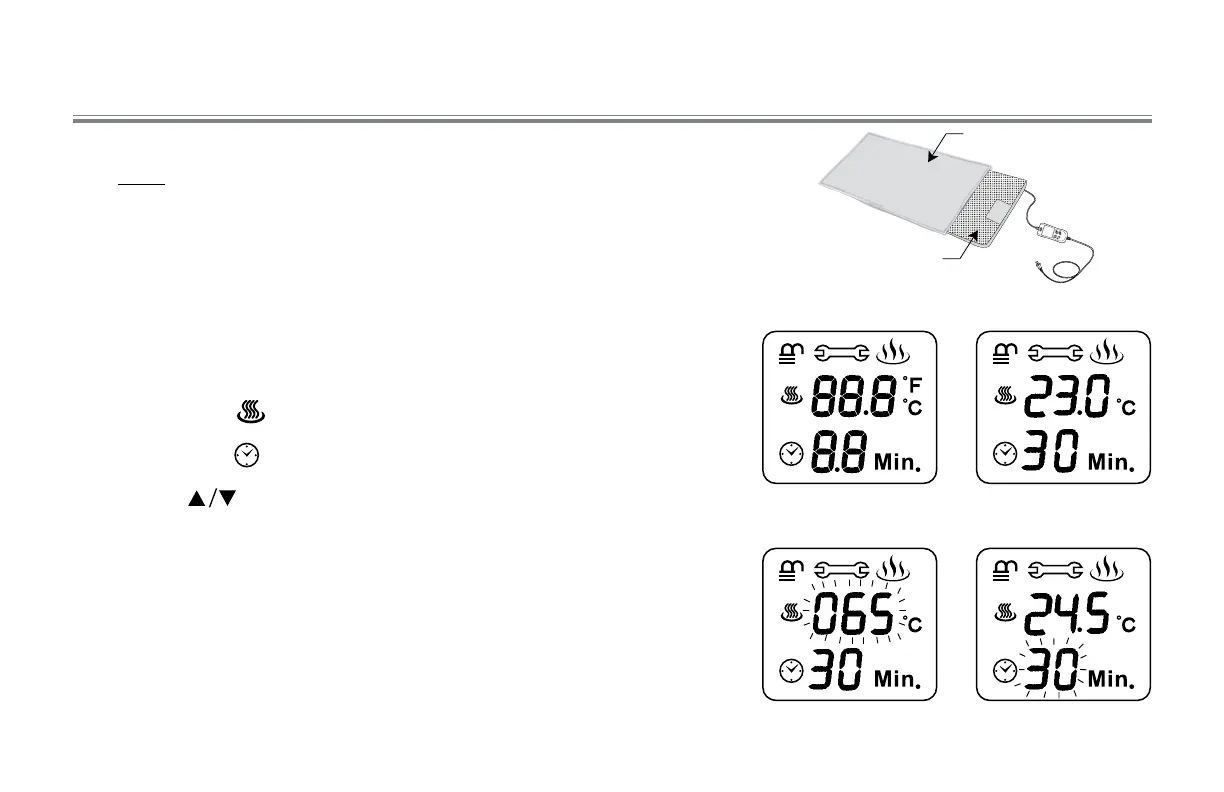
1. Fit the heating pad into the cotton cover sheet. NOTE: Always make sure
a clean cotton cover sheet is on the heating pad.
2. Plug into the outlet of 90-130V (40-70 Hz)
3. After making sure that the skin is free from dirt and sweat, place the pad
on the area of the body that you wish to treat.
4. Press the “ON/OFF” button “beep” sounds means power ON. The LCD
will be displayed full segment (P. 1) and the ambient temperature and
last-setting time will light up in the indicator panel (P.2 ).
5. Press the temp “ “ button to select the temperature. (P.3).
6. Press the time “ “ button to select the time. (P.4).
7. Press the “ “ button to increase or decrease values.
8. Continue to press in order to sustain increasing or decreasing of
parameter. Range: temperature : 45-75°C, time : 1-60 min.
How to Use the Device (°C unit)
Power ON
P. 1
Image Fig
P. 2
Cotton Cover
Heating Pad
Setup Temp.
P. 3
Setup Time
P. 4



 To Next Page