EasyManua.ls Logo

ThermaCell E Series - User Manual

ThermaCell E Series
2 pages
Print Icon
To Next Page IconTo Next Page
Loading...
Charging:
Fully Charged:
Low Battery (Less than 20 minutes):
Battery Too Low to be Turned On: Flashes
How It Works
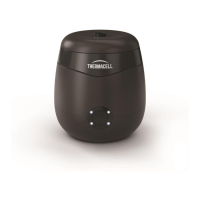
The Thermacell E-Series is an on-demand mosquito repeller.
The rechargeable battery powers a heater that diffuses mosquito
repellent from the repellent refill into the air. Turn it on and within 15
minutes you will be protected from mosquitoes in the surrounding area.
When finished using it just turn it off. It's that easy. No sprays to wash
off and no candles to blow out.
1. Getting Started
Your repeller has a rechargeable battery. Prior to first use, fully charge
the battery. To charge the battery pull back the rubber cover to expose
the USB charging port located on the front of the repeller. Insert the
charging cable provided with the repeller. The battery indicator is
located below the power button.
4. Place Your Device
Repeller is best placed in the center of the desired Zone of repellency.
If it is windy, place the repeller upwind of where you are sitting.
Only operate with vent facing up.
Do not cover repeller while it is in use.
To protect larger areas use multiple repellers.
Care & Storage
Occasionally debris or condensation may build up on your repeller
device. Simply use a damp paper towel or rag to wipe away any
build up.
Do not expose the repeller to extended periods of rain or submerge
in water.
Do not expose the repeller to temperatures above 140°F.
Store at room temperature in a dry environment when not in use.
Cap
Wick
Repellent
Reservoir
Diffuser Vent
Power Button
In the Box
1 E-Series Zone Mosquito Repeller
1 E-Series Zone Mosquito Repellent Refill
1 USB Cable
Repellent
Refill
Repeller
USB Cable
Control
Panel
USB Port under
power button
Battery Indicator Light
Questions?
We’re here
to help, 24/7
1-866-753-3837
service@thermacell.com
Thermacell Repellents, Inc.
26 Crosby Drive
Bedford, MA 01730 USA
2. Inserting a Repellent Refill
Remove top from repeller: To remove the top grasp the repeller
base with one hand and remove the top with the other.
Remove the cap from a Repellent Refill.
Insert the Repellent Refill into the repeller.
Replace the repeller top taking care not to damage the Repellent
Refill wick. The repeller uses magnets to hold the top to the
bottom of the device.
Use only Thermacell Repellent Refills.
Do not store with battery completely discharged for
extended periods of time. Batteries should be charged at
least once every 3 months during storage.
!
Control Panel
Your repeller will communicate different statuses through the control
panel.
Power Button - Turns device on and off.
Status Indicator - A visual communication tool that lets you know the
repeller status. No need to pick up the device or get close to check.
Chasing Pattern: Unit is warming up
Solid Illumination: Unit is up to temp/
Actively releasing repellent
3. Using Your Repeller
Press the power button to turn on.
The repeller will sound with an ascending tone and the battery
indicator will illuminate with current battery level. The repeller will
then display a chasing pattern of light indicating it is starting to
heat up. Once temperature is reached the ring will stay illuminated.
It can take up to 15 minutes for the Zone to fully establish.
To turn off press and hold the power button for two seconds:
You will hear a descending chime and all lights will turn off.
Press power button to turn on and off.
Question and Answer IconNeed help?

Do you have a question about the ThermaCell E Series and is the answer not in the manual?

Summary

Getting Started

Charge Battery

Instructions for charging the repeller's rechargeable battery before first use.

Battery Indicator Light

Understanding the battery indicator light states during charging and use.

Inserting a Repellent Refill

Refill Insertion Steps

Guide to safely remove the top, insert the refill, and replace the top.

Using Your Repeller

Operation and Status

How to turn the repeller on/off and understand its heating status indications.

Zone Establishment

Information on the time required for the repeller to establish its protection zone.

Control Panel Overview

Power Button Function

Details on the function of the power button for device operation.

Status Indicator Meanings

Explanation of the status indicator lights and their meanings.

Device Placement and Operation

Optimal Placement Tips

Guidance on where to place the repeller for maximum effectiveness in different conditions.

Area Coverage

Tips on using multiple repellers to protect larger areas.

Care and Storage

Maintenance and Cleaning

Instructions for cleaning and maintaining the repeller device.

Storage Recommendations

Guidelines for proper storage, including battery care during storage.

Important Safety Information

Battery Safety Precautions

Crucial safety guidelines for the lithium-ion battery, including charging and storage.

General Product Usage Warnings

Essential warnings regarding product handling, children's safety, and modifications.

Warranty and Disclaimers

Save These Instructions

Instruction to keep the user guide for future reference.

Limitation of Liability

Information on Thermacell's warranty terms and limitations of liability.

Overview

The Thermacell E-Series Zone Mosquito Repeller is an on-demand, rechargeable device designed to diffuse mosquito repellent into the air, creating a "Protection Zone" to keep mosquitoes away. It is intended for adult use and is not a toy.

Function Description:

The repeller utilizes a rechargeable battery to power a heater that diffuses mosquito repellent from a refill into the surrounding area. Once turned on, it establishes a mosquito-free "Protection Zone" within approximately 15 minutes. The device is designed for ease of use, with simple on/off functionality and no need for sprays or candles. It communicates its status through a visual control panel, eliminating the need to pick up the device to check its operational status.

Important Technical Specifications:

  • Power Source: Rechargeable lithium-ion battery.
  • Charging: Requires a USB Listed/Certified Class 2 Power unit charger marked 5V DC-1000 mA. The USB charging port is located on the front of the repeller, under a rubber cover.
  • Battery Indicator: Located below the power button, it shows charging status (chasing pattern), fully charged (solid illumination), low battery (flashing), and battery too low to turn on (rapid flashing).
  • Operating Temperature for Charging: 40°F to 110°F.
  • Storage Temperature: Room temperature, dry environment, not above 140°F.
  • Repellent Refills: Exclusively uses Thermacell Repellent Refills.

Usage Features:

  • Getting Started:
    • Prior to first use, the battery must be fully charged.
    • To charge, pull back the rubber cover to expose the USB port and insert the provided charging cable.
    • The battery indicator light will show the charging progress.
  • Inserting a Repellent Refill:
    • Remove the top from the repeller by grasping the base with one hand and the top with the other.
    • Remove the cap from a new Repellent Refill.
    • Insert the Repellent Refill into the repeller.
    • Replace the repeller top, taking care not to damage the Repellent Refill wick. Magnets secure the top to the device.
  • Turning On:
    • Press the power button.
    • The repeller will emit an ascending tone.
    • The battery indicator will illuminate to show the current battery level.
    • A chasing light pattern indicates the unit is warming up.
    • Once the operating temperature is reached, the ring will stay illuminated, signifying active repellent release.
    • It takes up to 15 minutes for the Protection Zone to fully establish.
  • Turning Off:
    • Press and hold the power button for two seconds.
    • A descending chime will sound, and all lights will turn off.
  • Control Panel Status Indicators:
    • Chasing Pattern: Unit is warming up.
    • Solid Illumination: Unit is up to temperature and actively releasing repellent.
  • Placement:
    • Best placed in the center of the desired Zone of repellency.
    • If windy, place the repeller upwind of where you are sitting.
    • Must be operated with the vent facing up.
    • Do not cover the repeller while in use.
    • For larger areas, multiple repellers can be used.

Maintenance Features:

  • Battery Storage:
    • Do not store with the battery completely discharged for extended periods.
    • Batteries should be charged at least once every 3 months during storage.
    • If stored for more than a year, discharge and recharge the battery to maintain optimal capacity.
  • Cleaning:
    • Occasionally, debris or condensation may build up.
    • Use a damp paper towel or rag to wipe away any build-up.
  • Environmental Precautions:
    • Do not expose the repeller to extended periods of rain or submerge it in water.
    • Do not expose the repeller to temperatures above 140°F.
    • Store at room temperature in a dry environment when not in use.
  • Safety Warnings:
    • Inspect packaging before transport; do not transport if the battery housing is damaged.
    • Close supervision is necessary when used near children. Keep out of reach of children.
    • Do not put fingers, hands, metal, or other foreign objects into the product.
    • Do not remove the battery from the equipment housing.
    • Do not modify or attempt to repair the device.
    • Discontinue use and dispose of safely if any leaks, odors, or deformities are noticed in the battery housing.
    • Only use Thermacell Repellent Refills; using other refills or unapproved parts may cause damage, injury, or poor product performance, for which Thermacell will not be responsible.

ThermaCell E Series Specifications

General IconGeneral
BrandThermaCell
ModelE Series
CategoryInsect Control Equipment
LanguageEnglish

Related product manuals