6
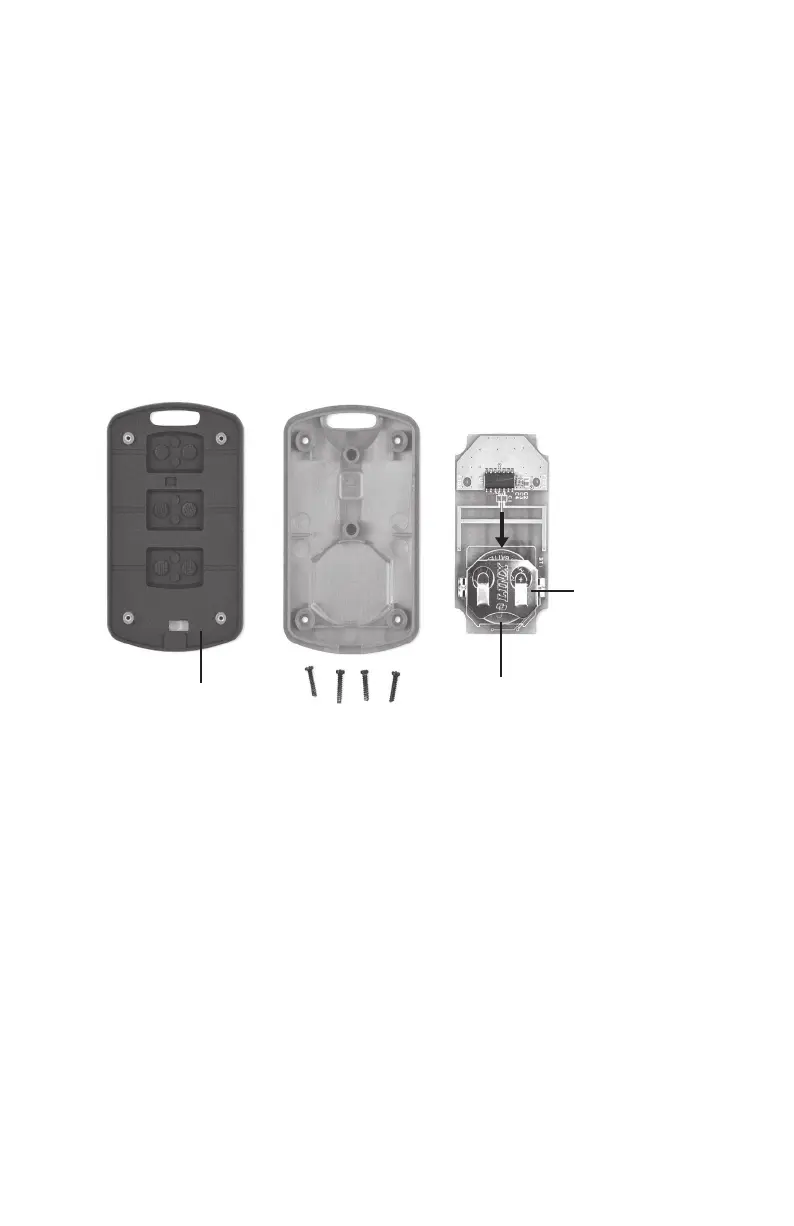
HOUSING FRONT
RUBBER SPACER
BATTERY
BATTERY
HOLDER
PUSH
BATTERY
OUT TO
REMOVE
HOUSING BACK CIRCUIT BOARD
Remote Control Battery Replacement
The Remote Control comes equipped with one Lithium Cell # CR2032. The battery should last
approximately two years under normal usage. However, to ensure uninterrupted service from the remote,
replace the battery annually. To replace the battery:
1. Remove the four small Phillips screws on the underside of the Remote Control.
2. Lay both sides of the Remote Control open on a table (see Figure 9 ). Remove the green printed
circuit board and turn the board over so the battery holder is facing up. Using a coin, carefully
push the battery out from under the battery holder.
3. Replace the battery by inserting the new battery back into the holder making certain that the
positive (+) side of the battery is facing up.
4. Return the green circuit board to its original position making certain the battery is located on
the underside of the printed circuit board. Now place the housing front with the black rubber
spacer piece over the circuit board.
5. With the two sides of the Remote Control together, secure the two side panels by replacing the
four small Phillips screws.
Important Information if Insoles are Not Heating
or Operating Correctly
Perform the following actions if the Insoles do not seem to be heating correctly:
1. Recharge the batteries in the Smart Charging Case until the LEDs on the Smart Charging Case turn
green (LEDs will only turn green when the batteries are fully charged).
2. Verify the LED on the Remote Control illuminates when any button is pushed. If not, replace the
battery in Remote Control.
3. After inserting batteries into the Insoles, select the High setting on the Remote Control. Verify
the Insole LED in the battery compartment ashes in groups of three. If not, see Remote Control
Reprogramming Instructions.
4. If Insoles are still not functioning, please contact ThermaCELL Customer Service.


 To Next Page
 Loading...