Need help?
Do you have a question about the Thermaltake ARGENT K5 RGB and is the answer not in the manual?
Resets the keyboard to factory defaults, including all lighting and macro settings.
Assigns keys to open the default email client or web browser.
Assigns keys to launch My Computer, Calculator, or Multimedia Player.
Controls for switching front-side lighting effects and their properties.
Controls for switching side-face lighting effects and their properties.
Adjusts lighting effect speed and the brightness of red, green, and blue LEDs.
Switches between monochrome and random color modes, and adjusts LED brightness.
Manages lighting effect direction and switches between saved user profiles.
Records and assigns macros directly from the keyboard without software.
Sets up and records custom lighting effects for specific keyboard zones.
Enables full keyboard lock, WASD key switching, and Game Mode functionality.
Adjusts keyboard brightness, locks the Windows key, and lists software requirements.
Step-by-step guide for installing the TT iTAKE software, including prerequisites.
Explains switching between keyboard configuration pages and managing profiles.
Covers assigning key functions, setting PC IP address, and restoring keyboard settings.
Restores a key to its original, default function.
Assigns a new single key value to a selected key.
Configures a key to execute a recorded macro sequence.
Assigns keys to control media playback functions like play/pause.
Assigns keys to system shortcuts or common application functions.
Assigns keys to launch specific applications or websites with a URL.
Links keys to specific in-game profiles and actions for enhanced gameplay.
Disables a specific key to prevent it from performing any action.
Covers creating, deleting, copying, importing, and exporting macros and text.
Details settings for macro recording, including delay times and methods.
Step-by-step guide for recording a new macro sequence and setting delay.
Instructions on how to insert or edit content within an existing recorded macro.
Guide for recording and assigning specific character sets or text strings.
Lists the 13/14 supported lighting effects and basic configuration options.
Covers applying/restoring lighting effects and managing color patterns.
Configures color and brightness for static lighting effects in specific areas.
Allows customization of colors for individual keys within static lighting.
Sets color and speed for pulse lighting effects across keyboard zones.
Configures color patterns, direction, speed, and brightness for wave lighting.
Sets color patterns, direction, speed, and brightness for spiral rainbow effects.
Adjusts speed and brightness for the spectrum cycling lighting effect.
Configures color and speed for reactive lighting effects on key presses.
Sets color, speed, and brightness for the flow lighting effect.
Configures color, speed, and brightness for the ripple lighting effect.
Sets color, direction, speed, and brightness for the ribbon lighting effect.
Configures color, speed, and brightness for the scan lighting effect.
Sets color, speed, and brightness for the raindrop lighting effect.
Configures color, direction, speed, and brightness for the marquee lighting effect.
Sets color and speed for the blink lighting effect across keyboard zones.
Configures lighting effects to synchronize with music playback modes.
Sets colors for different rows based on sound or music input.
Configures lighting effects to display system temperature readings.
Allows users to set the program's language and access official website/social media.
Displays software/firmware versions, sets APP password, and configures Amazon Alexa.
 General
| Rollover | N-key rollover |
|---|---|
| Polling rate | 1000 Hz |
| Numeric keypad | Yes |
| Actuation force | 45 g |
| Keyboard layout | QWERTY |
| Pointing device | No |
| Device interface | USB |
| Keyboard language | English |
| Recommended usage | Gaming |
| Key travel distance | 1.2 mm |
| Keyboard key switch | Mechanical |
| Keyboard form factor | Full-size (100%) |
| Built-in memory capacity | 500 KB |
| Keyboard keys operating life | 50 million characters |
| Keyboard key switch technology | Cherry MX RGB Speed Silver |
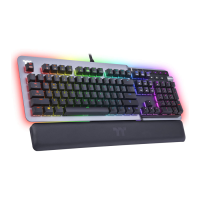
| Material | Aluminum |
| Product color | Titanium |
| Backlight type | RGB LED |
| Keyboard style | Straight |
| Backlight color | Multicolor |
| Surface coloration | Monochromatic |
| Connector contacts plating | Gold |
| Cable length | 1.8 m |
| USB 2.0 ports quantity | 1 |
| Number of products included | 1 pc(s) |
 Weight and Dimensions
| Keyboard weight | 1465 g |
|---|---|
| Keyboard dimensions (WxDxH) | 465 x 161 x 46 mm |

 To Next Page