Need help?
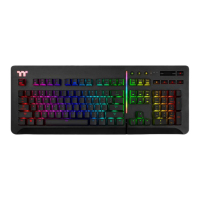
Do you have a question about the Thermaltake Level 20 RGB and is the answer not in the manual?
Utilize key combinations for quick access to common functions like Email and Web Browser.
Access My Computer, Calculator, and Multimedia Player via keyboard shortcuts.
Manage front side lighting effects, including color, speed, and direction.
Manage side face lighting effects, including color, speed, and direction.
Adjust lighting speed and RGB brightness levels for various effects.
Switch between keyboard profiles and change lighting effect direction.
Record macros directly on the keyboard without software.
Configure area-specific backlighting with presets and custom recording.
Lock the keyboard, switch WASD/direction keys, and enable Game Mode.
Adjust full keyboard brightness, lock Windows key, and review software requirements.
Guide through launching, installing, and completing the TT iTAKE software setup.
Switch between configurations, manage profiles, and assign key functions.
Configure default, single key, macro, media, hotkey, application, and gaming profile assignments.
Create, delete, copy, import, and export macros and text entries.
Steps for recording macros, selecting delays, and inserting new content.
Overview of lighting effects, color selection, pattern settings, and application.
Configure Static, Pulse, Wave, Spiral Rainbow, Spectrum Cycling, Reactive, Flow, Ripple, Ribbon, Scan, Raindrop, Snake, Marquee, Blink, Music, Sound, and Temperature modes.
Manage language, software versions, password, and integrate with Amazon Alexa.
Download, connect, and control keyboard features like lighting and macros via the TT iTAKE app.
 General
| Rollover | N-key rollover |
|---|---|
| Polling rate | 1000 Hz |
| Windows keys | Yes |
| Keyboard layout | QWERTY |
| Pointing device | No |
| Device interface | USB |
| Keyboard language | English |
| Recommended usage | Gaming |
| Keyboard key switch | Mechanical |
| Keyboard form factor | Full-size (100%) |
| Keyboard keys operating life | 50 million characters |
| Keyboard key switch technology | Cherry MX Speed Silver |
| Product color | Black |
| Backlight type | RGB LED |
| Keyboard style | Straight |
| Backlight color | Various |
| Surface coloration | Monochromatic |
| Cable length | 1.8 m |
 Weight and Dimensions
| Keyboard weight | 1500 g |
|---|---|
| Keyboard dimensions (WxDxH) | 482 x 185.93 x 43.93 mm |

 To Next Page