
 Need help?
Do you have a question about the Thermaltake Core P5 and is the answer not in the manual?
Details the technical specifications of the computer case, including dimensions and compatibility.
Lists the included accessories and components provided with the computer case.
Provides crucial safety warnings and important notices regarding component size limitations.
Instructions on how to safely remove the side panels of the chassis.
Steps for correctly installing the power supply unit into the chassis.
Guide on how to properly install the motherboard into the chassis.
Instructions for installing both 3.5-inch and 2.5-inch hard disk drives.
Steps for installing PCI expansion cards into the motherboard.
Guidance on the process of installing liquid cooling components within the chassis.
Procedure for installing the side window panel onto the chassis.
Instructions for setting up the chassis in a vertical orientation.
Steps for installing the chassis in a horizontal orientation.
Guide for securely mounting the chassis onto a wall.
How to connect case LED indicators and switch leads to the motherboard.
Steps for correctly connecting the USB 3.0 cable to the computer.
Guide for connecting front panel audio connectors to the motherboard.
 General
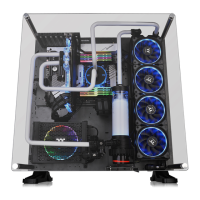
| Type | Open Frame |
|---|---|
| Material | SPCC |
| Expansion Slots | 8 |
| PSU Clearance | 200mm |
| Color | Black |
| Motherboard Support | Mini ITX, Micro ATX, ATX |
| Dimensions | 608 x 333 x 570 mm |
| GPU Clearance | 320mm |
| I/O Ports | 2 x USB 3.0, 2 x USB 2.0 |
| Side Panel | 5mm Tempered Glass |




 To Next Page