10
11
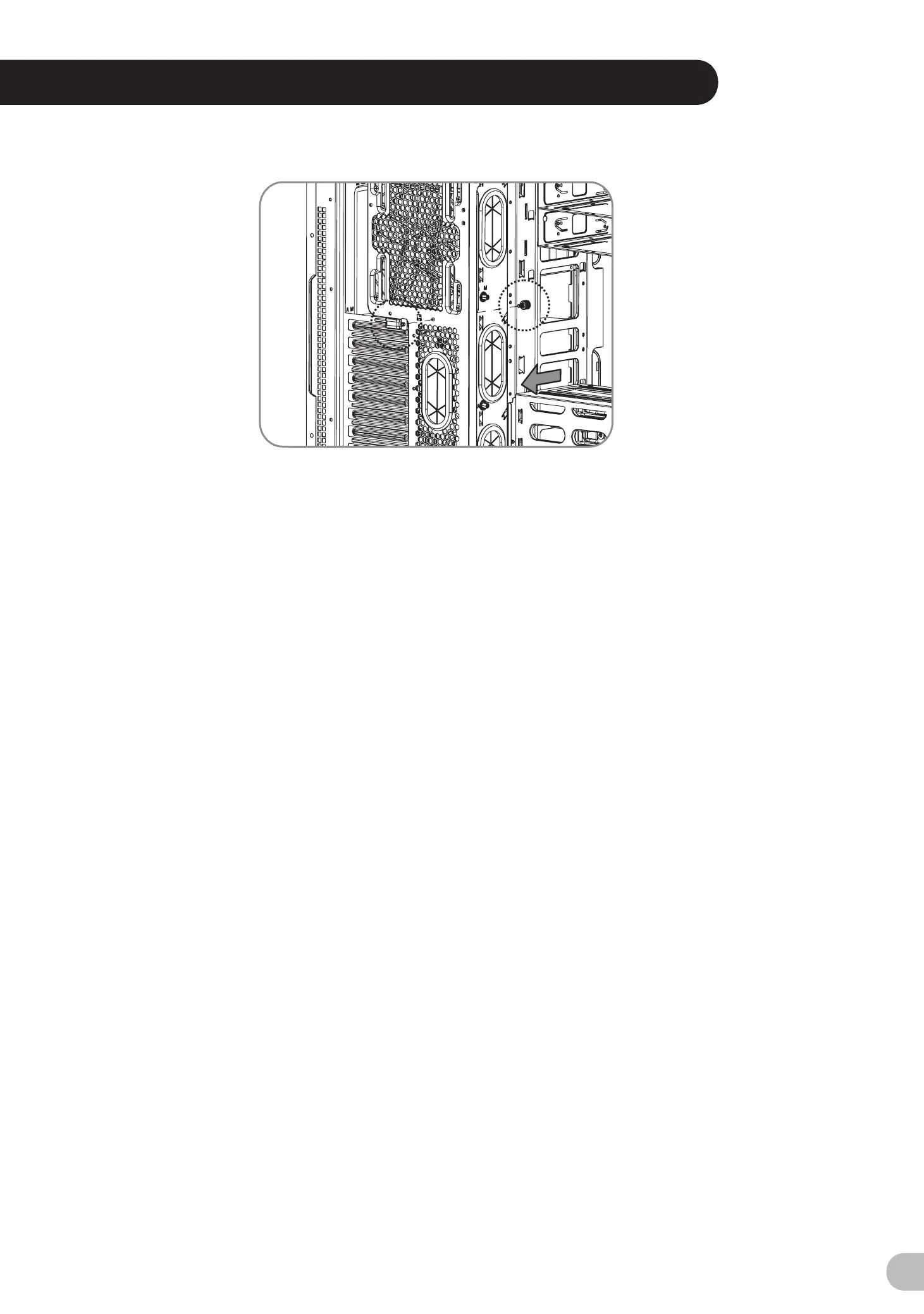
PCI Card Installation
English /
繁體中文 /
简体中文 /
Deutsch /
日本語 /
Français /
Русский /
Español /
Türkçe /
Italiano /
Insert the PCI card into the PCI slot, and
將 PCI 卡插入 PCI 插槽,然後用螺絲固定。
secure it with screw.
将 PCI 卡插入 PCI 插槽并以螺丝固定。
Stecken Sie die PCI Karte in den PCI
Steckplatz und sichern Sie sie mit Schrauben.
PCI カードを PCI スロットに挿入し、ねじで固
定します。
Insérez la carte PCI dans le slot PCI et
sécurisez-la avec des vis.
Вставьте PCI-карту в слот PCI и закрепите
ее винтом.
Inserte la tarjeta PCI en la ranura del PCI y
asegúrela con tornillos.
PCI kartını, PCI yuvasına yerleştirin ve vidayla
sabitleyin.
Inserire la scheda PCI nello slot PCI e fissarla
con la vite.
ภาษาไทย /
ใส่การ์ด PCI ในสล็อต PCI แล้วขันสกรูยึดให้แน่น
Português/
Insira a placa PCI na ranhura PCI e fixe com
parafusos.
Keyboard & Mouse Security Lock Usage
English /
Deutsch /
Français /
Español /
Italiano /
Português/
Passe os cabos do teclado ou do rato através do
"Bloqueio de Segurança do Teclado e Rato" e fixe
na parte traseira do painel no interior do chassis,
com parafusos.
Place the keyboard or mouse cables through the
“Keyboard & Mouse Security Lock” then secure it
back to the back panel from inside of the chassis
with screw.
Führen Sie die Kabel durch die Einheit “Tastatur- &
Maussperren” und sichern Sie sie dann wieder an
der Rückwand innerhalb des Gehäuses mit den
Schrauben.
Mettez les câbles du clavier ou de la souris à travers
le “verrou de sécurité de clavier & souris” puis
sécurisez-les sur le panneau arrière à l'intérieur du
châssis avec des vis.
Mettez les câbles du clavier ou de la souris à travers
le “verrou de sécurité de clavier & souris” puis
sécurisez-les sur le panneau arrière à l'intérieur du
châssis avec des vis.
Posizionare i cavi della tastiera o del mouse sulla
“tastiera e il blocco di sicurezza del mouse”, quindi
fissarli sul pannello posteriore dall’interno dello
chassis con la relativa vite.
繁體中文 /
简体中文 /
日本語 /
Русский /
Türkçe /
將鍵盤或滑鼠纜線穿過「鍵盤和滑鼠安全鎖」,然後用
螺絲將其固定回機殼內的背板。
将键盘或鼠标缆线穿过“键盘和鼠标安全锁”,然后用螺
丝将其固定回机箱内侧。
「キーボードとマウスのセキュリティロック」を通し
てキーボードまたはマウスケーブルを収納し、ねじで
シャーシ内部から背面パネルに再び締め付けます。
Проведите кабели клавиатуры и мыши через зам
ок и подключите их. Закрутите замок обратно изн
утри корпуса.
Klavye veya fare kablolarını “Klavye ve Fare
Güvenlik Kilidi” üzerinden yerleştirin ve daha sonra,
güvenlik kilidini kasanın iç tarafından arka panele
yeniden vidalayın.
ภาษาไทย /
เดินสายแป้นพิมพ์หรือสายเมาส์ลอดผ่าน
“อุปกรณ์เก็บสายแป้นพิมพ์และเมาส์”
จากนั้นให้ขันสกรูยึดอุปกรณ์เก็บสายพร้อมสายเข้ากับ
แผงด้านหลังของแชสซีส์ให้แน่น
藍色線條為尺寸標示,請勿印刷上去!
產品料號
CA-1F8-00M1WN-00 Core X71
說明書
15/11/30
A
產品名稱
印刷項目
發稿日期
版本
騎馬釘28 105G
雙銅
單色 無無
其他特殊處理效果表面處理
2
厚度(g/m )
裝訂方式 材質頁數 印刷色彩
規格樣式
整本
CHECK DESIGN
Peipei
15.11.26
Mike.Lin
15.11.26
刀模線
125 mm
176 mm





 To Next Page