EasyManua.ls Logo

Thermo Electron ELECTRA - Page 18

Thermo Electron ELECTRA
20 pages
Print Icon
To Next Page IconTo Next Page
To Previous Page IconTo Previous Page
Loading...
- 2 -
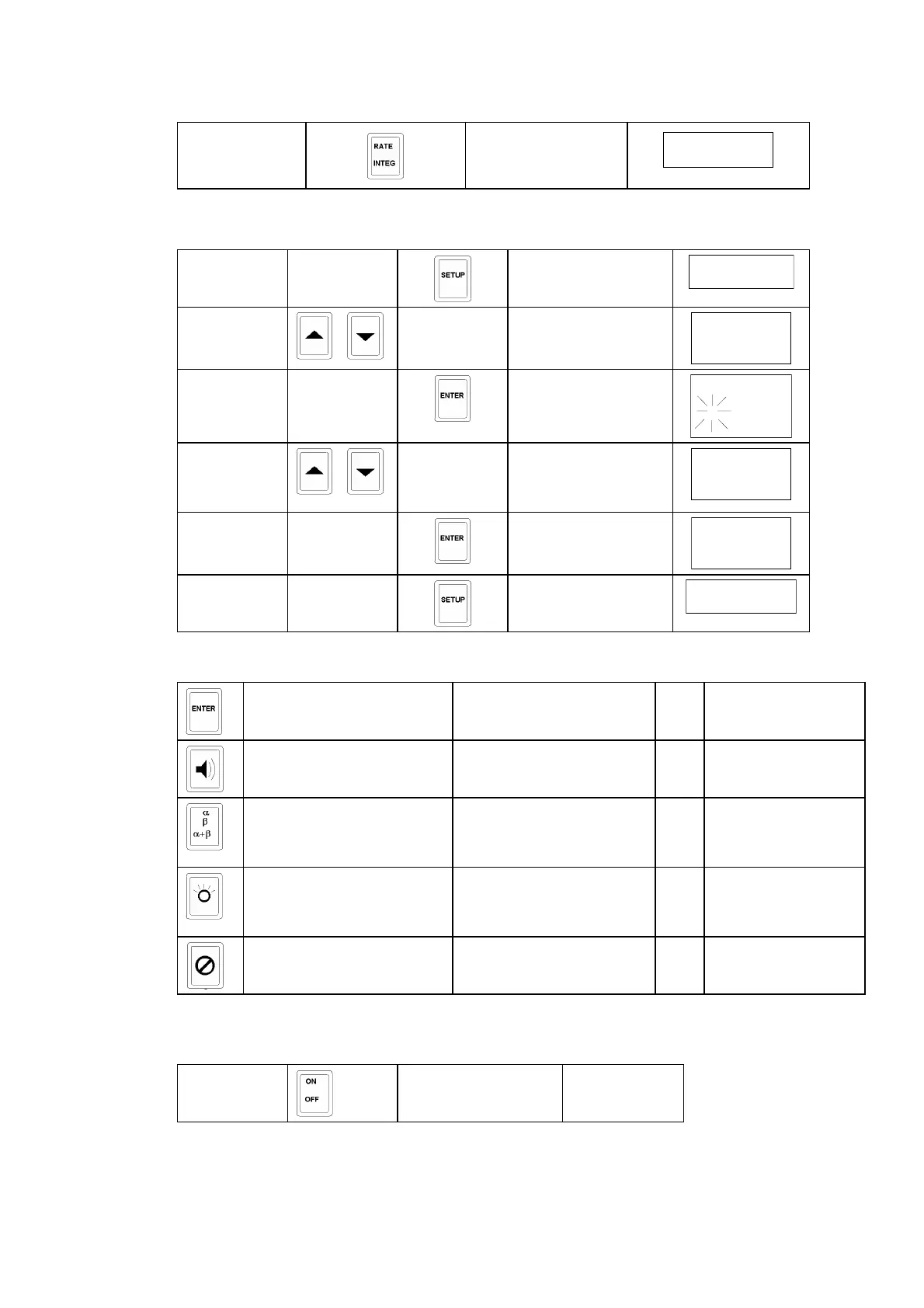
1.1.3 Integrate Rate
press
Ratemeter Mode
1.1.4 Modify Parameters
First press
Parameter List
then use
/
to find the
parameter
3
then press
Parameter flashes to
show edit mode
3
then use
/
to select the
required
value
19.50
then press
new value registered
3
finally press
for change to take
effect
Ratemeter Mode
1.1.5 Other Functions
stores background at any time during
ratemeter mode
or at the end of
integration
toggles to enable / disable
sound
and mutes alarm sound
temporarily
changes display and sound
of incoming particles
from α to β to α + β
or Displays integrated
dose for Geiger
probes
provides backlight one press gives 30 seconds or three quick presses
for continuous
operation
inhibits changes to
parameters
use within parameter list
view
1.1.6 Switch - off
press
unit off

Related product manuals